Backlog is created by importing pieces, recasts, or increasing the Qty of pieces. To add or remove backlog, follow these steps using the View/Edit Production Piece Marks screen.
1. Navigate to Engineering menu > View/Edit Production Pieces. (see Figure 1)
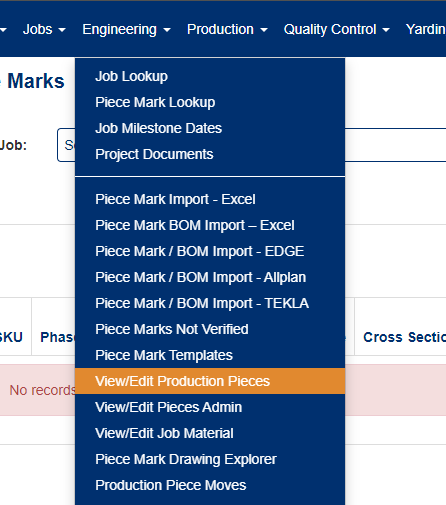
Figure 1
2. Select the Job you need to edit.
3. Click edit on the piece mark you want to edit. (see Figure 2)
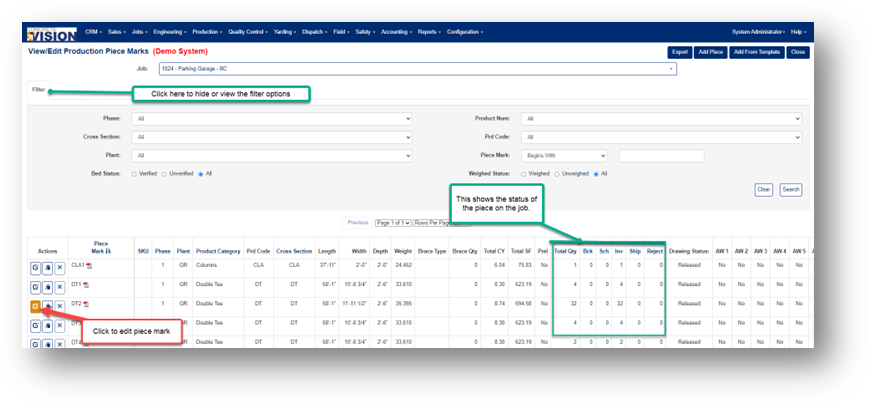
Figure 2
4. Here is the Qty of this piece mark. Down below shows each piece and its status. (see Figure 3)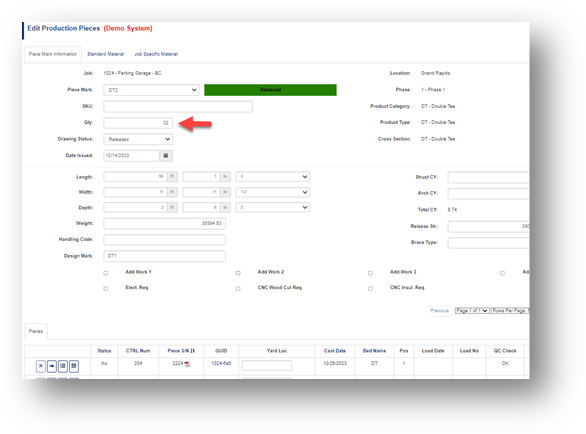
Figure 3
To Add Backlog - Simply adjust the Quantity (Qty) to the desired amount.
For instance, if you wish to add 1 piece, set the Qty to 33 or to add 7 pieces, set it to 39.
**Remember to save the changes by clicking on the 'Save' option located at the top right of the page
To Remove Backlog – Edit the Qty amount.
Example: If you wish to reduce by 1, set the Qty to 31 and hit Save. To reduce by 7 reduce the Qty amount to 25 and hit Save.
Was this article helpful?
That’s Great!
Thank you for your feedback
Sorry! We couldn't be helpful
Thank you for your feedback
Feedback sent
We appreciate your effort and will try to fix the article