Overview
The Production NCR Undo Complete screen (Figure 2) allows you to re-open previously completed or closed-out NCRs. This includes NCRs with the following statuses:
- Recast - Scrap
- Repair Complete
- Repair Not Needed
- Complete without Repair
Accessing the Screen
Access the screen through the Quality Control > Production NCR Undo Complete menu item (Figure 1).
Figure 1 - Production NCR Undo Complete list screen
Figure 2 - Production NCR Undo Complete interface
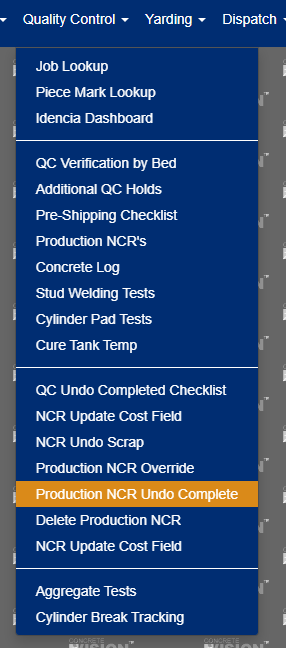
Figure 1
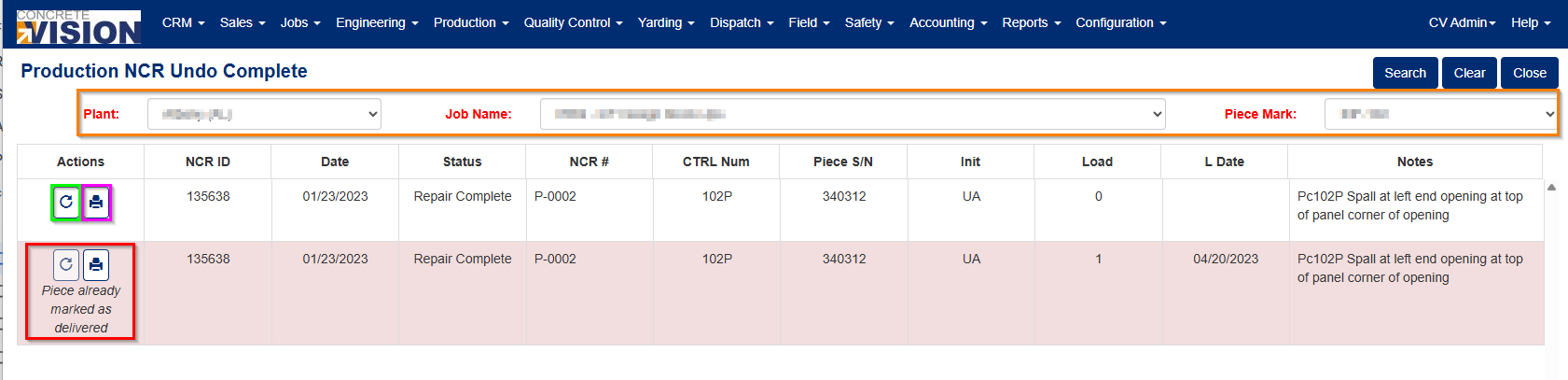
Figure 2
Using the Production NCR Undo Complete Screen
Step 1: Filter Your Results
Begin by filtering to the desired piece mark using the filter criteria highlighted in the orange box in Figure 2. This helps narrow down your search to relevant NCRs.
Step 2: Search for NCRs
After applying your filters, click "Search" to display any production NCRs for that piece with the following statuses:
- Recast - Scrap
- Repair Complete
- Repair Not Needed
- Complete Without Repair
Step 3: Undo an NCR
To undo an NCR, click the "Undo" button (highlighted in the green rectangle in Figure 2). This opens the dialog shown in Figure 3, which allows you to return the NCR to a different open status.
Figure 3 - NCR status change dialog
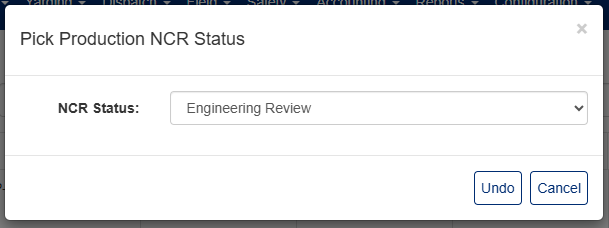
Figure 3
Important Notes
Automatic Actions
When you undo a "Recast - Scrap" NCR, the system will automatically delete the associated recast piece if it remains in backlog status.
When Undo is Disabled
The undo function will be disabled and an error message will appear next to the NCR (see red box in Figure 2) under these conditions:
- The QC Date occurs before the closeout date
- The piece has already shipped
- The remake is no longer in backlog status (applies to "QC - Scrap" NCRs)
Additional Features
The purple box in Figure 2 provides access to view a detailed report for any selected NCR.
Was this article helpful?
That’s Great!
Thank you for your feedback
Sorry! We couldn't be helpful
Thank you for your feedback
Feedback sent
We appreciate your effort and will try to fix the article