Overview
The QC Verification by Bed screen allows quality control users to search for and review scheduled pours by cast date, plant location, and production bed. For each bed, the screen displays which jobs and piece marks are scheduled to pour and provides direct access to the Pre-Pour and Post-Pour inspection checklists required for QC verification.
Accessing the Screen
Navigate to Quality Control > QC Verification by Bed from the main menu (Figure 1).
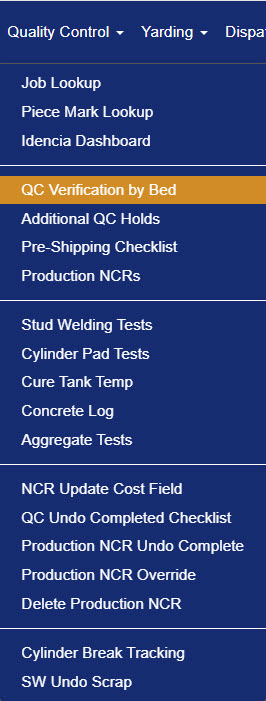
Figure 1
QC Verification by Bed Screen
The QC Verification by Bed presents a calendar view — switchable between Week, Month, and Day — showing all beds scheduled for pouring (Figure 2). Use the search filters at the top to narrow results by Cast Date, Location, and Bed.

Figure 2
A color-coded legend at the top of the screen indicates the status of each bed at a glance:
| Color | Meaning |
| Blue | Non-production day. |
| White | Bed not poured. |
| Red | Missed pour. |
| Orange | Bed maintenance. |
| Dark orange | Bed poured. |
| Light blue | Bed partially verified. |
| Yellow | Bed verified with NCRs. |
| Green | Bed verified, ready to ship. |
Each day cell in the calendar displays one or more bed tables for any beds scheduled on that date (Figure 2).
Understanding the Bed Table
Each bed entry on the calendar is made up of two stacked tables (Figure 3).
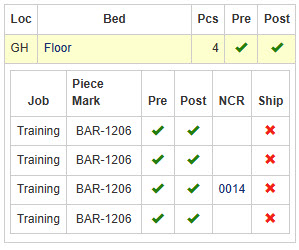 Figure 3
Bed QC status row — the top row summarizes the overall status of the bed:
| Column | Description |
| Loc | Plant Location. |
| Bed | Bed name. |
| Pcs | Number of pieces scheduled to pour on this bed. |
| Pre | Status of the Pre-Pour checklist. |
| Post | Status of the Post-Pour checklist. |
Piece mark QC status table — below the bed row, each line represents an individual piece mark scheduled on that bed:
| Column | Description |
| Job | Job Name. |
| Piece Mark | Piece Mark. |
| Pre | Status of the Pre-Pour checklist. |
| Post | Status of the Post-Pour checklist. |
| NCR | NCR number if an open Non-Comformance Report exists for this piece. |
| Ship | Status of the Pre-Shipping checklist. |
QC Task Status Key
- Blank column: the task has not yet started.
- Red X: the task has started but not completed.
- Green check mark: the task is completed.
Accessing the Pre-Pour and Post Pour Checklists
To open a checklist for a bed, click the Bed Name in the bed table. This takes you directly to the QC Pre-Pour Checklist screen. https://helpdesk.concretevision.com/support/solutions/articles/11000114542-qc-pre-pour-check-list
To switch to the Post-Pour Checklist, select the Post Pour tab at the top of that screen. https://helpdesk.concretevision.com/support/solutions/articles/11000114543-qc-post-pour-check-list
Was this article helpful?
That’s Great!
Thank you for your feedback
Sorry! We couldn't be helpful
Thank you for your feedback
Feedback sent
We appreciate your effort and will try to fix the article