Overview
The Fineness Modulus is a critical parameter used in concrete quality control to evaluate the particle size distribution of fine aggregates (sand). This configuration allows you to set up specifications that determine whether a fine aggregate's fineness modulus meets your project requirements.
What is Fineness Modulus?
Fineness Modulus is a numerical index that represents the fineness or coarseness of fine aggregate. It's calculated from the cumulative percentages retained on a series of standard sieves. A lower value indicates finer aggregate, while a higher value indicates coarser aggregate.
Key Features
- Multiple Specifications: As of December 2023, you can configure multiple Fineness Modulus specifications for different project requirements
- Default Selection: One specification can be set as default for new aggregate tests
- Fine Aggregate Only: This specification applies exclusively to fine aggregate tests
- Quality Control Integration: Automatically validates test results against your specified criteria
Accessing Fineness Modulus Configuration
Navigation Path: Configuration menu → Quality Control Setup → Fineness Modulus
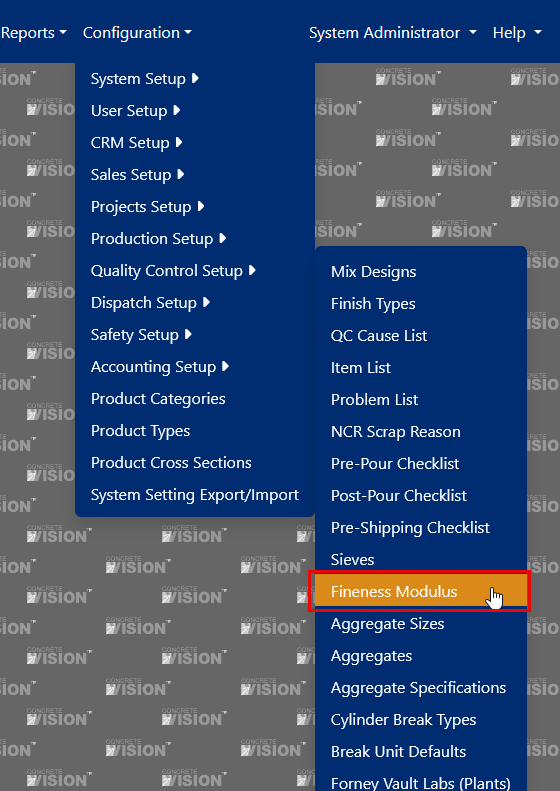
Figure 1
Configuration Fields
Required Fields
| Field | Description | Purpose |
|---|---|---|
| Name | Specification identifier | Use descriptive names like "ASTM C33" or "Project XYZ Standard" |
| Min | Minimum acceptable fineness modulus | Lower boundary for passing results |
| Max | Maximum acceptable fineness modulus | Upper boundary for passing results |
| Sieve Variance | Maximum allowable difference between sieves | Typically 0.20 -0.50 depending on specification |
| Max Variance | Maximum deviation from base fineness module | Used for consistency checks in production |
Optional Fields
| Field | Description | Recommended Use |
|---|---|---|
| Default | Pre-selects this spec for new tests | Choose your most commonly used specification |
| Active | Controls visibility in dropdown menus | Disable unused specifications without deleting them |

Figure 2
Managing Fineness Modulus Specifications
Adding a New Specification
Access the Interface
- Click the [Add new record] button in the main interface (Red box, Figure 2)
Complete the Form
- Name: Enter a clear, descriptive name (e.g., "ASTM C33 Standard")
- Sieve Variance: Set based on your quality requirements
- Min/Max Values: Define your acceptable range
- Max Variance: Set tolerance for production consistency
- Default: Check if this should be the default selection
- Active: Ensure this is checked to make the specification available
Save the Configuration
- Click [Save] to create the new specification (Yellow box, Figure 3)
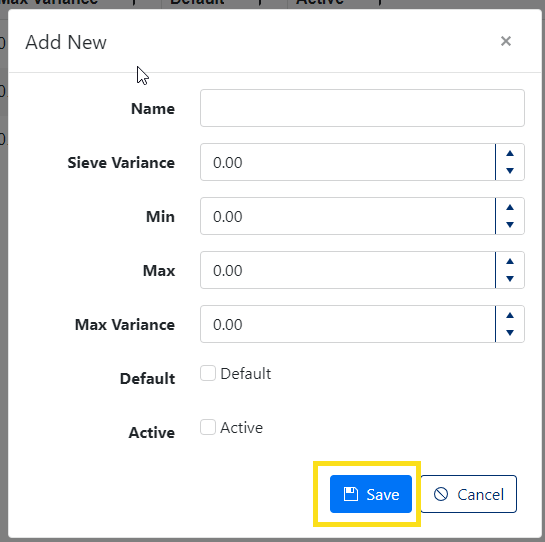
Figure 3
Editing Existing Specifications
Select Record to Edit
- Click the pencil icon (✏️) next to the specification you want to modify (Orange box, Figure 2)
Update Fields
- Modify any field values as needed
- Consider the impact on existing test data
Save Changes
- Click [Save] to apply your modifications (Green box, Figure 4)
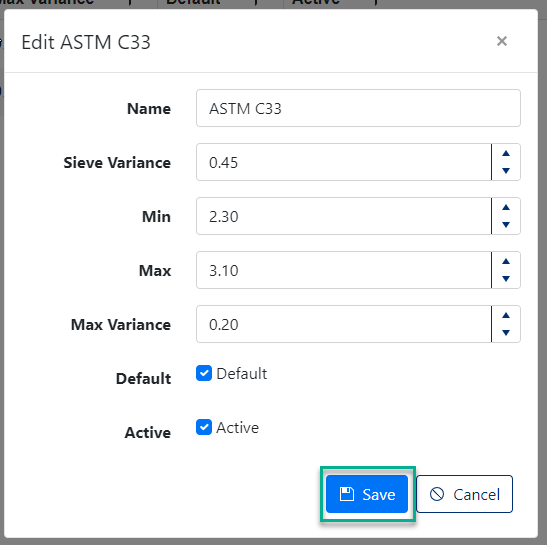
Figure 4
Deleting Specifications
⚠️ Important Limitation: You cannot delete Fineness Modulus specifications that have been used in aggregate tests.
To Delete an Unused Specification:
- Click the [X] delete button next to the specification (Purple box, Figure 2)
- Confirm deletion in the popup dialog
- Click [OK] to permanently remove the specification

Figure 5
Note: If you can't delete a specification because it's been used, consider deactivating it instead by unchecking the Active field.
Using Fineness Modulus in Aggregate Tests
When creating a new aggregate test with "Fine" selected as the Aggregate Grade:
- The Fineness Modulus Spec field becomes available
- Your default specification is automatically selected
- You can change to any active specification from the dropdown
- The selected specification will be used to evaluate test results
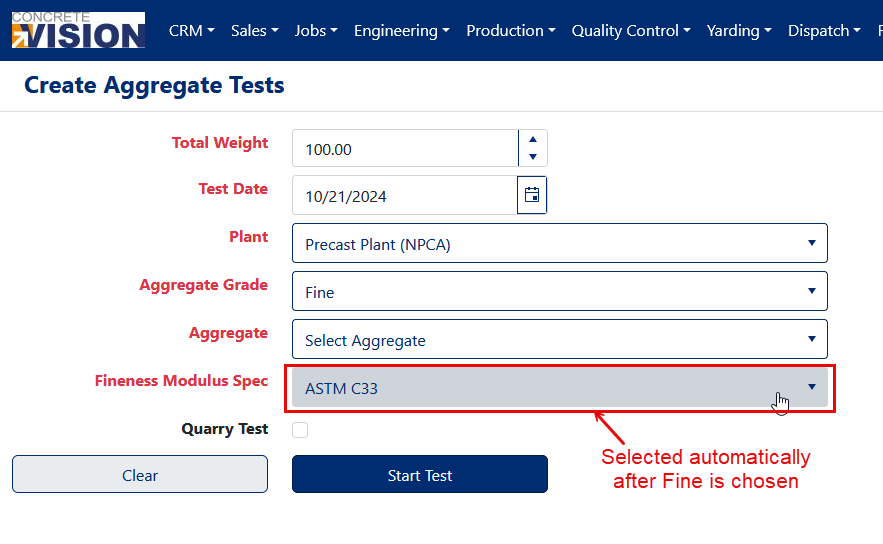
Figure 6
Was this article helpful?
That’s Great!
Thank you for your feedback
Sorry! We couldn't be helpful
Thank you for your feedback
Feedback sent
We appreciate your effort and will try to fix the article