You access the Finish Types from the Configuration > Quality Control Setup menu (Figure 1).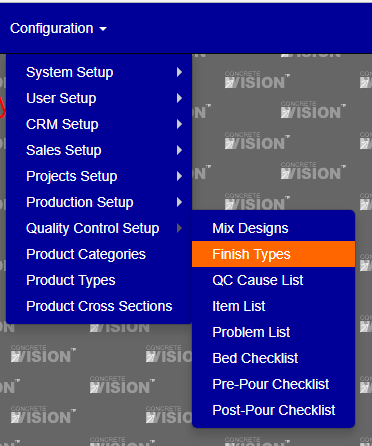 .
.
Figure 1
The Finish Types screen (Figure 2) is where you can add and edit Finish Types.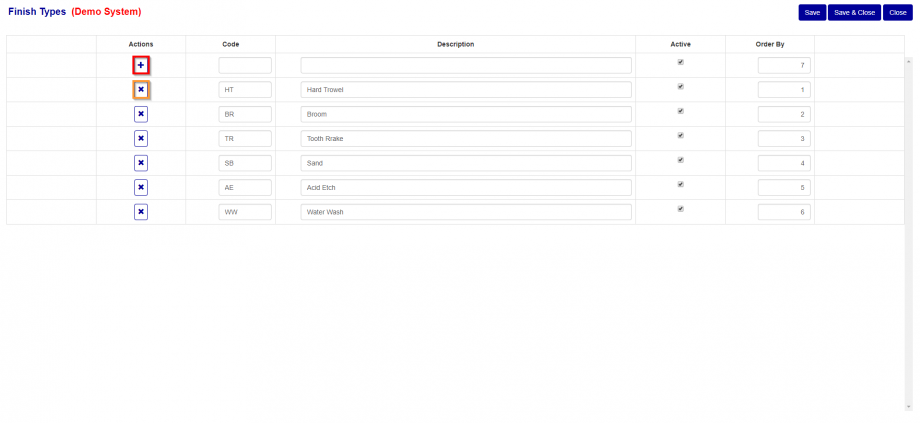
Figure 2
Add Finish Type
To add new Problem (Red Box in Figure 2):
- Enter a Code.
- Enter a Description
- Check or uncheck the active .
- Enter an order by.
Edit Finish Type
To edit an Finish Type, just update any one of the column values and then select the “Save” or” Save & Close” button to save your changes. If you don’t click on either the “Save” or “Save & Close” button and navigate off this screen, your changes will be lost.
Delete Finish Type
To delete an Finish Type, just click on the X button under Actions of the Finish Type you wish to delete. You can only delete QC Problem that are not currently assigned to an product. If an Finish Type is assigned to an product, the delete button will be disabled.
Was this article helpful?
That’s Great!
Thank you for your feedback
Sorry! We couldn't be helpful
Thank you for your feedback
Feedback sent
We appreciate your effort and will try to fix the article