Overview
GL Code Types (General Ledger Code Types or Cost Code Types, depending on your system configuration) are organizational categories that help classify and group your general ledger accounts in Concrete Vision. These code types create connections between your accounting structure and operational elements like estimates, labor tracking, and material costs.
Key Benefits:
- Organize GL codes into logical categories
- Link accounting data to project estimates and labor
- Streamline timesheet and cost allocation processes
- Improve financial reporting accuracy
Accessing GL Code Types
Navigate to GL Code Types using either of these menu paths:
Option 1 (General Ledger): Configuration menu → Accounting Setup → GL Code Types
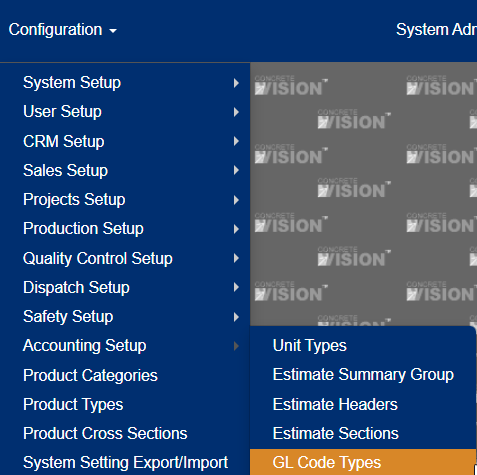
Figure 1
Option 2 (Cost Codes): Configuration menu → Accounting Setup → Cost Code Types
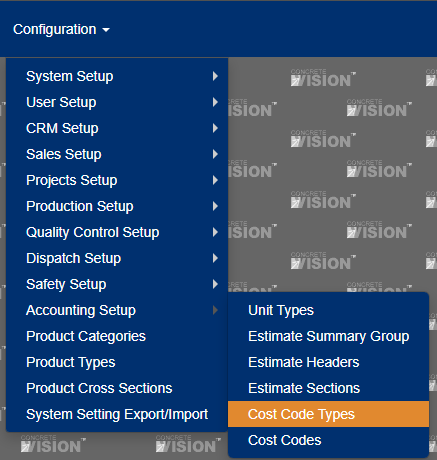
Figure 2
Note: The specific menu option depends on your system configuration.
Understanding Default Code Types
Concrete Vision provides 8 predefined labor categories that GL Code Types can be associated with:
Labor Categories | Description |
|---|---|
Sub Task | Project subtask activities |
Direct Labor | Primary production labor |
Direct Labor - Other | Additional direct labor categories |
Indirect Labor | Support and overhead labor |
Engineering Labor | Design and engineering work |
Truck Labor | Transportation and delivery |
Project Management Labor | PM and supervisory activities |
Field Labor | On-site operational work |
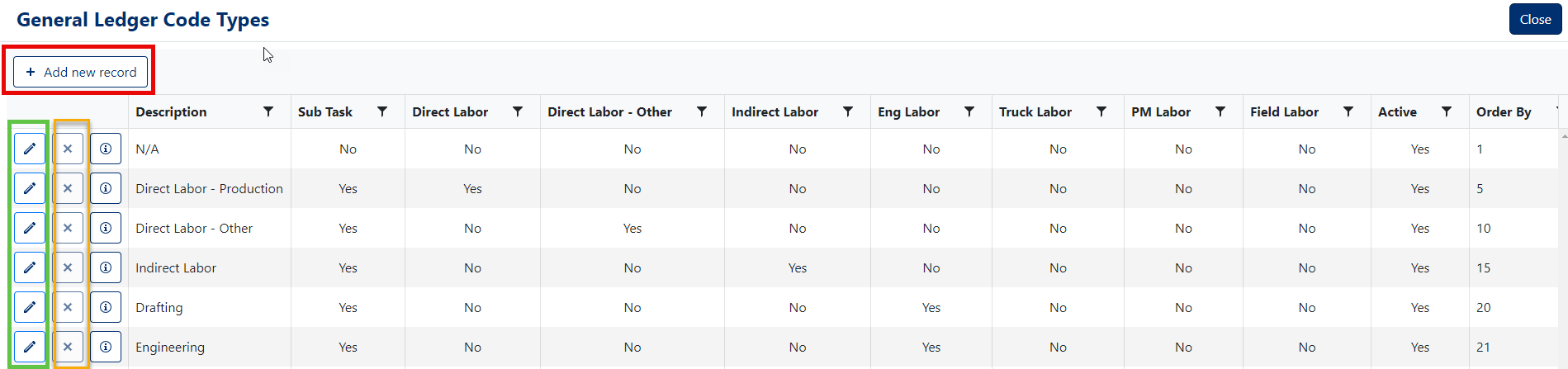
Figure 3
Managing GL Code Types
Adding a New GL Code Type
Access the Interface
- Click the "Add new record" button (Red box, Figure 3)
Complete Required Information (Figure 4)
- Description: Enter a clear, descriptive name (Required)
- Labor Categories: Select all applicable checkboxes for the labor types this code should include
- Active Status: Leave checked to make the code type available for selection
- Order By: Accept the default number or specify a custom sort order
Save Your Changes
- Click the "Save" button to create the new record (Orange box, Figure 4)
Note: Inactive code types will not appear in Employee Timesheet selections.
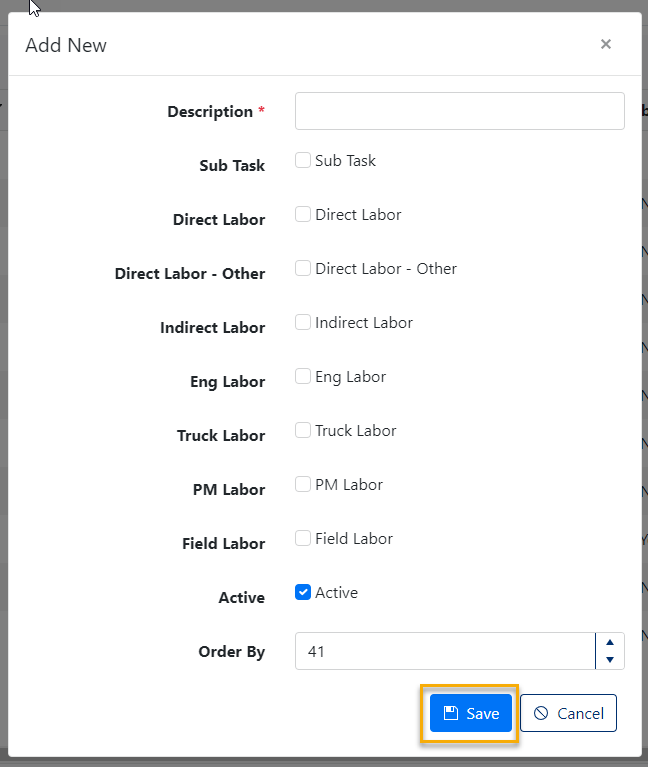
Figure 4
Editing an Existing GL Code Type
Select the Record
- Click the pencil icon next to the GL Code Type you want to modify (Green box, Figure 4)
Make Your Changes
- Update any field as needed
- Modify labor category associations
- Change active/inactive status
- Adjust the sort order
Save Your Changes
- Click the "Save" button to apply your modifications (Orange box, Figure 5)
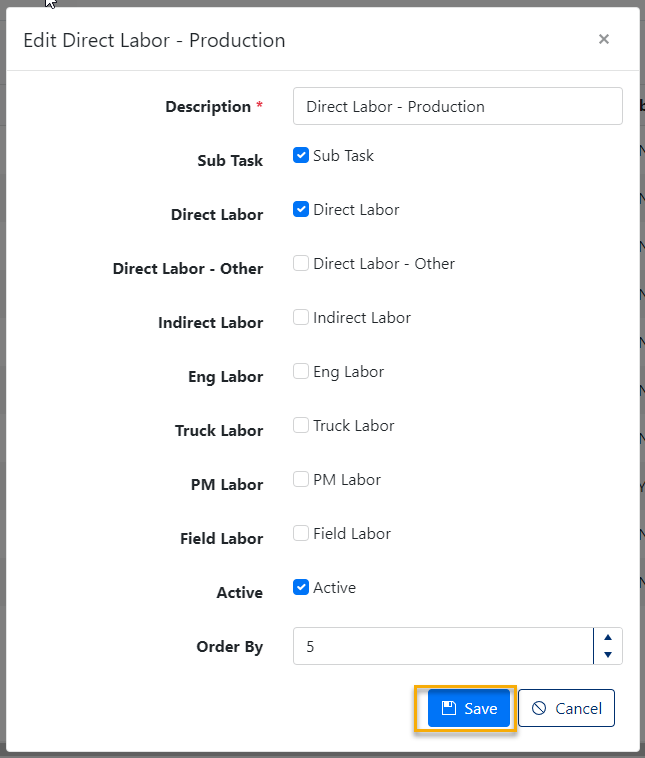
Figure 5
Deleting a GL Code Type
Note: Deleting a GL Code Type is permanent and may affect historical data.
Select for Deletion
- Click the [X] delete button to the left of the record (Orange box, Figure 3)
Confirm Deletion
- A confirmation dialog will appear asking: "Are you sure you want to delete this record?"
- Click [OK] to proceed or [Cancel] to abort (Figure 6)
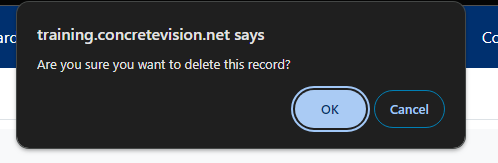
Figure 6
Best Practice: Instead of deleting, consider setting a code type to "Inactive" to preserve data integrity while removing it from active use.
Best Practices
Setup Recommendations
- Use descriptive names that clearly indicate the code type's purpose
- Organize Order By values in logical increments (10, 20, 30, etc.) to allow for future insertions
- Review labor category associations carefully to ensure proper cost allocation
Maintenance Tips
- Regularly audit your GL Code Types to ensure they align with current business needs
- Consider the impact on historical reporting before making changes
- Test changes in a non-production environment when possible
Integration Considerations
- Ensure GL Code Types align with your accounting system requirements
- Coordinate with your accounting team before adding or modifying code types
- Consider how changes will affect existing estimates and labor tracking
Was this article helpful?
That’s Great!
Thank you for your feedback
Sorry! We couldn't be helpful
Thank you for your feedback
Feedback sent
We appreciate your effort and will try to fix the article