Overview
The Stressing Pumps screen is part of the configuration needed in Concrete Vision to complete Stressing Calculations on production beds.
Accessing the Screen
Navigate to Configuration > Production Setup > Stressing Pumps from the main menu (Figure 1).
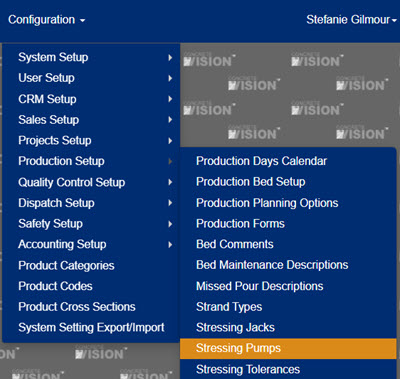 Figure 1
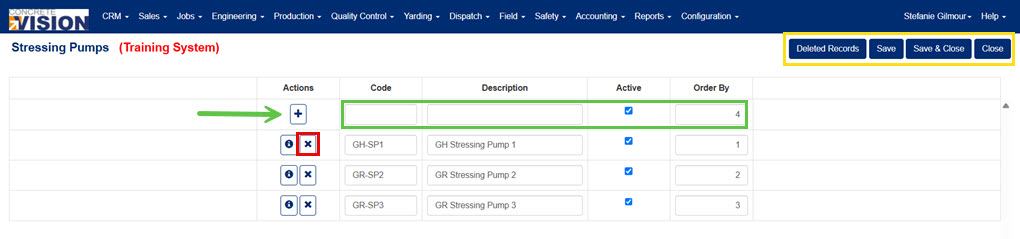
Figure 2
Understanding the Stressing Pumps Fields
- Code: a unique 10 character code for each stressing pump.
- Description: the full description of each stressing pump.
- Active: a checkbox that indicates if the stressing pump is active or not, if not active it will not show up on any screens.
- Order By: used to sort how the stressing jacks will be shown on screens.
Add a Stressing Pump
From the Stressing Pumps screen (Figure 2):
- Fill in the top row (green box in Figure 2) of the stressing pumps table.
- Click the “+” button (green arrow in Figure 2) to add the new Stressing Pump.
Edit a Stressing Pump
From the Stressing Pumps screen (Figure 2):
- Change the values on the row of the stressing pump to edit.
- Click the Save button (yellow box Figure 2) to save info and remain on the screen or the Save & Close button (yellow box Figure 2) to save info and close the screen.
Delete a Stressing Pump
From the Stressing Pumps screen (Figure 2):
- Click the Delete icon (red box in Figure 2) of the corresponding row of the stressing pump to delete.
- Click Okay to confirm deletion.
Note: Stressing pumps can not be deleted if associated with any stressing calculations.
Was this article helpful?
That’s Great!
Thank you for your feedback
Sorry! We couldn't be helpful
Thank you for your feedback
Feedback sent
We appreciate your effort and will try to fix the article