You access the Equipment screen from the Configuration menu under Dispatch Setup (Figure 1).
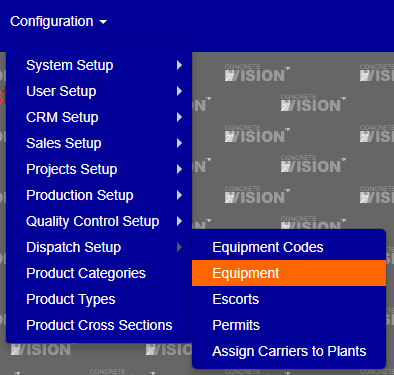
Figure 1
The Equipment screen (see Figure 2) is where you can view and edit Equipment.

Figure 2
Add Equipment
To add a new piece of equipment, first click on the “Add New” button (Green box Figure 2) to navigate to the piece information screen (Figure 3).
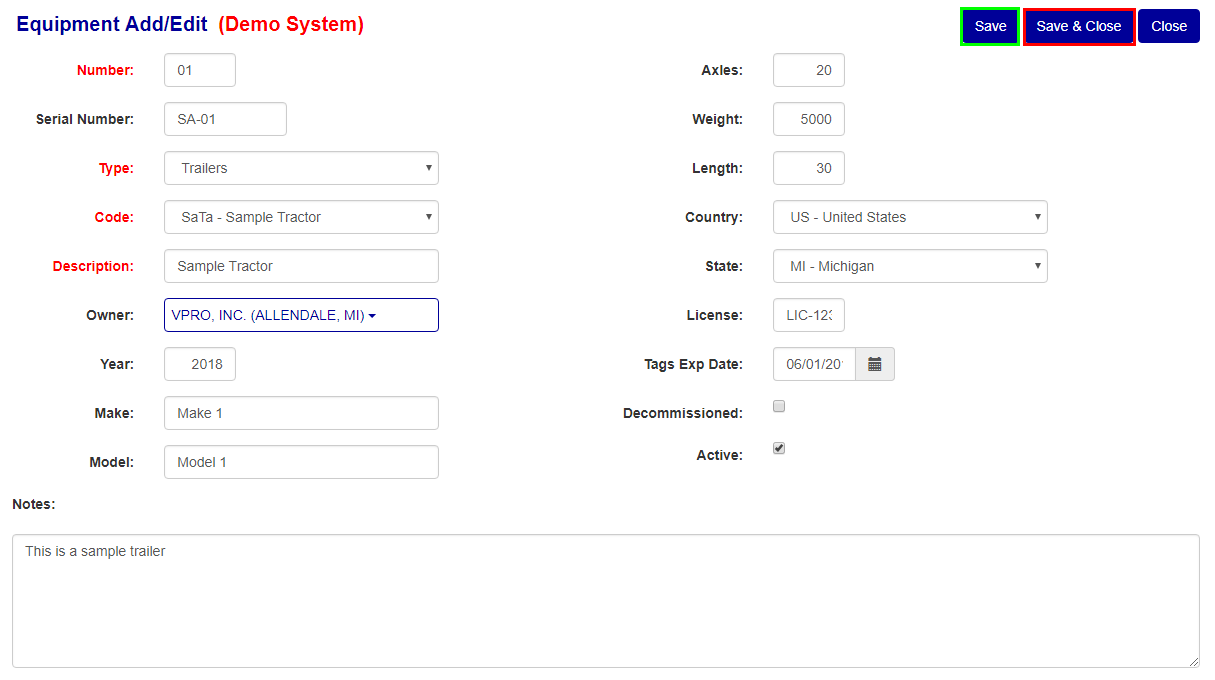
Figure 3
Once on the piece information screen, the information will be blanked out and numbers set to zero. Fill in all required information (denoted with a red label) and any additional non-required information.
Once the screen is filled in, click the “Save” (Green box Figure 3) or “Save and Close” (Red box Figure 3) button respective to whether you want to save then continue editing or save and leave back to the list screen.
Edit Equipment Information
To edit any equipment information, navigate to the list screen and click the corresponding edit button to the equipment you wish to edit (Yellow box Figure 2). Once on the edit screen change any information then press one of the “Save” buttons.
Delete Equipment
To delete any of the pieces of equipment, click the “x” button (red box Figure 2) of the corresponding row of the code you wish to delete.
Was this article helpful?
That’s Great!
Thank you for your feedback
Sorry! We couldn't be helpful
Thank you for your feedback
Feedback sent
We appreciate your effort and will try to fix the article