Overview
A Schedule of Values (SOV) template is a document used in construction projects to outline the budget and payment schedule for various components or tasks within the project. Using the SOV template, you can setup your default items that will be copied to each project.
Accessing the Screen
Navigate to Accounting > Schedule of Values Template from the main menu (Figure 1).
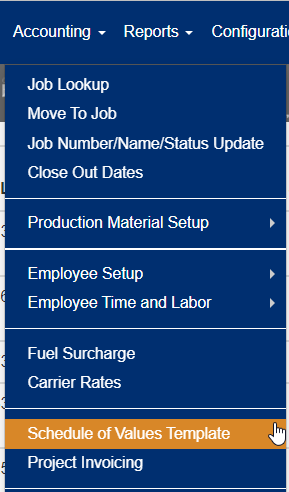
Figure 1
Using the Schedule of Values Template Screen
From the Schedule of Values Template screen (Figure 2) you can add, edit or delete the specific items to include when copied to each project.
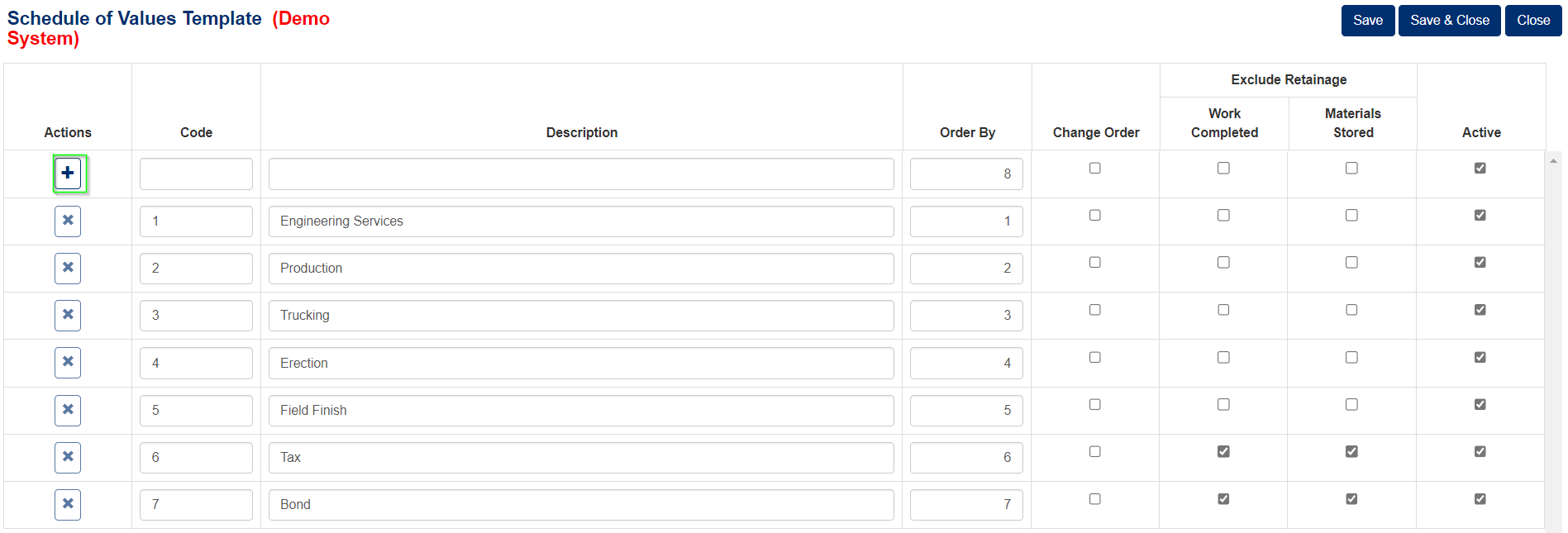
Figure 2
Add an Item to the Schedule of Values Template
To add an item to the Schedule of Values Template:
- Fill out the blank fields in the first row of the table.
- Enter the Code up to 10 characters
- Enter a description up to 50 characters
- Enter the Order By.
- The Change Order checkbox is used to indicate if this line item is for change orders.
- The next two checkboxes are used to indicate if the line item should be excluded from retainage.
- The final checkbox is where the line item is active and should be copied to a job.
- Click the “+” button (Green box Figure 2) to add the information.
Edit an Item to the Schedule of Values Template
To Edit an item on the Schedule of Values Template:
- Edit the data fields as needed.
- Click the Save button to save changes or the Save & Close button to save changes and close the screen.
Delete an Item to the Schedule of Values Template
To delete an item on the Schedule of Values Template:
- Click the Delete icon in the first column of the corresponding row to be deleted.
- Confirm the deletion on the popup window that appear.
Note: The delete action will only be available if that line item has not be used on a job.
Was this article helpful?
That’s Great!
Thank you for your feedback
Sorry! We couldn't be helpful
Thank you for your feedback
Feedback sent
We appreciate your effort and will try to fix the article