Overview
The Piece Mark BOM Import feature allows you to bulk import bill of materials (BOM) for piece marks into Concrete Vision using a standardized Excel template. This streamlines the process of managing material requirements for your jobs.
Accessing the Import Screen
Depending on your system, navigate to the import screen via the:
Engineering menu > Piece Mark BOM Import - AutoCAD (Figure 1) or
Engineering menu > Piece Mark BOM Import - Excel (Figure 2)
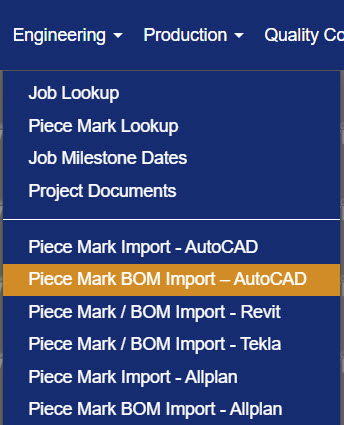
Figure 1
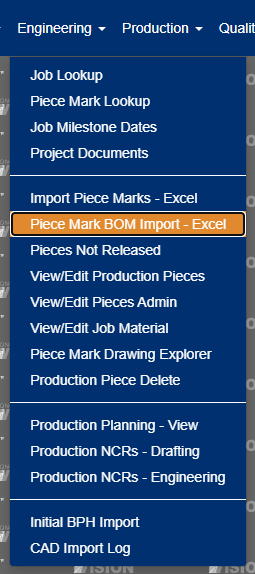
Figure 2
Choosing the Right Template
Concrete Vision provides three Excel templates for importing piece mark BOMs. Choose the template that matches your preference:
Template Options
| Template Type | Quantities | Materials Used For |
|---|---|---|
| Material Import - Job Level | Estimated Quantities (radio button) | Production, CIP, Erection |
| Material Import - Job Level | Actual Quantities (radio button) | CIP, Erection |
| Material Import - Product Code Level | Estimated Quantities | Production, CIP, Erection |
| Material Import - Piece Mark Level | Actual Quantities | Production |
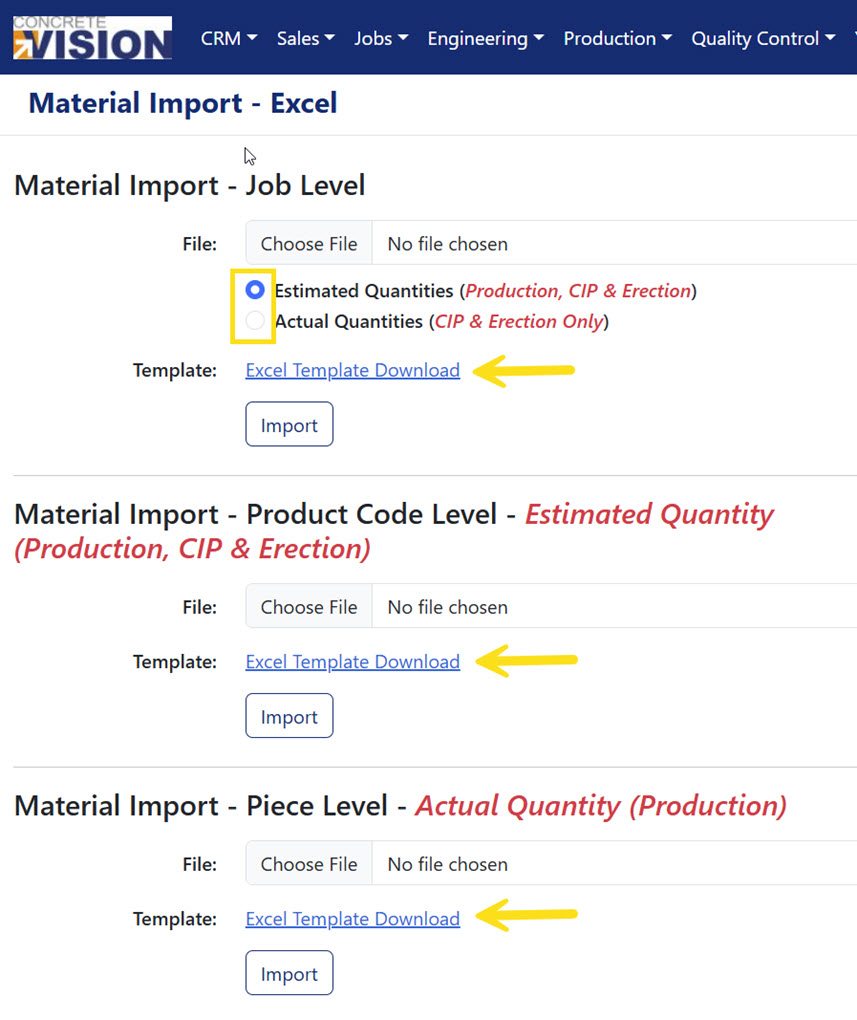
Figure 3
How to Download Material Import Templates
- Click on the download link for your preferred template (Yellow arrows, Figure 3).
- Save the Excel file to your computer.
- Open the template and begin entering your piece mark data on the Sheet 1 worksheet (Yellow box, Figure 4).
Note: There are two versions of the Material Import - Job Level Excel template. Select the radio button (yellow box in Figure 2) for either "Estimated Quantities" or "Actual Quantities" before clicking the download link.
Understanding Field Definitions
Each Excel import template contains two worksheets (tabs):
- Sheet 1 - Where you enter your materials data (Yellow box, Figure 4)
- Instructions - Reference sheet explaining each field (Blue box, Figure 4)
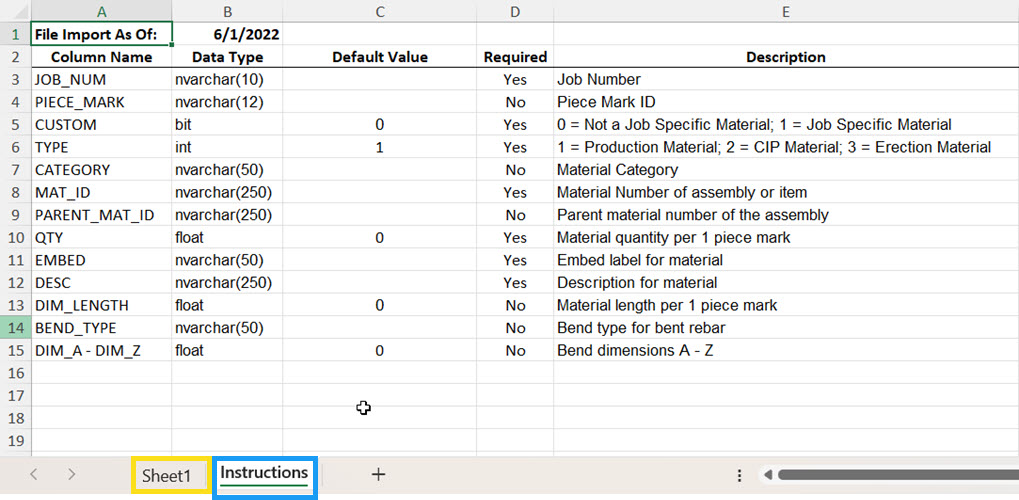
Figure 4 - Material Level Piece Mark Import Template
Note: The "Default Value" column shows what value will be used if you leave a field blank.
Required Fields (Must be completed)
| Field Name | Data Type | Description |
|---|---|---|
| JOB_NUM | Text (10 chars) | Job Number |
| PLANT | nvarchar(12) | Plant ID |
| CUSTOM | bit | Is the material standard or job specific? 0 = Not a Job Specific Material; 1 = Job Specific Material |
| TYPE | Integer | What type of material? 1 = Production Material; 2 = Cast in Place Material; 3 = Erection Material |
| MAT_ID | Text (250 chars) | Material Number of assembly or item |
| QTY | Float | Quantity of material needed per 1 piece mark |
| EMBED | Text (50 chars) | Embed label mapped to category for the specific material number. |
| DESC | Text (250 chars) | Description for material |
Note: The JOB_NUM values in your imported spreadsheet must match existing Job Number values in Concrete Vision.
Required Fields (Must be completed on Product Code Template ONLY)
| Field Name | Data Type | Description |
|---|---|---|
| PRD_CODE | nvarchar(12) | Product Code |
Note: PIECE_MARK is not included in the Product Code import template.
Optional Fields
| Field Name | Data Type | Description |
|---|---|---|
| PIECE_MARK | Text (12 chars) | Piece Mark ID, if specified, must match a piece mark existing within the job specified by the Job Number field in Concrete Vision. Piece Mark ID is required if TYPE=1 (job specific material). Piece Mark ID should be blank if TYPE= 2 (CIP material) or 3 (erection material). |
| CATEGORY | Text (50 chars) | Material Category |
| PARENT_MAT_ID | Text (250 chars) | Material Number of the assembly (if applicable) |
| DIM_LENGTH | float | Material length per 1 piece mark (if required) |
| BEND_TYPE | Text (50 chars) | Bend type for bent rebar |
| DIM_A - DIM_Z | float | Bend dimensions A-Z for bent rebar |
Note: The PIECE_MARK values in your imported spreadsheet must match existing Piece Mark values in Concrete Vision.
Important notes on importing BOM information:
- The file will only process material for piece marks listed in the file, so all material for the piece mark needs to be listed in the file. If there is material assigned to the piece mark and is not included on a subsequent import, that material will be deleted from Concrete Vision.
- The material will not update if the piece mark has quantity with a status of Inventory, Shipped or Rejected.
- All material requires a MAT_ID (material number). If the material number does not exist, it will be added automatically. Standard material: the material number needs to be unique across all other standard material.
Job-specific material: the material number needs to be unique across all other job specific material for the specific job. - PARENT_MAT_ID is the material number of an assembly. The parent material number needs to exist in Concrete Vision prior to assigning it to sub-material items. If creating new assemblies, list the parent material first in the import file.
Import Process
Step-by-Step Instructions
Download the appropriate template
Open the Excel file and navigate to the "Sheet 1" worksheet
Enter your bill of materials data, starting at row 2:
- Each row represents one material, item, or assembly
- Fill in all required fields (marked "Yes" in the Instructions tab)
- Leave optional fields blank if not needed
Save your completed Excel file
Return to Concrete Vision and access Engineering > Piece Mark BOM Import - Excel
Click Choose File button
Browse to select your completed Excel file
Select the matching template type
Click the "Import" button
Review any import messages or errors
Next Steps After Import
After a successful import, navigate to Engineering menu > Piece Marks Not Verified to commit the new material information to Concrete Vision.
Best Practices to Avoid Import Errors
Creating Assemblies
- List the parent material on its own row first
- Follow with child materials, each referencing the parent's MAT_ID in the PARENT_MAT_ID field
- Ensure all quantities are per-piece calculations
Material Numbering
- Develop a consistent numbering scheme for your materials
- Use prefixes to distinguish between material types
- For job-specific materials, consider including the job number in the material ID
Data Validation
- Review your Excel file carefully before importing
- Verify all required fields are populated
- Check that material quantities are accurate
- Confirm piece marks match exactly (including case sensitivity)
Import Strategy
- Start with a small test import to verify your data format
- Back up existing BOM data before large imports
- Import during off-peak hours to avoid conflicts with active users
Was this article helpful?
That’s Great!
Thank you for your feedback
Sorry! We couldn't be helpful
Thank you for your feedback
Feedback sent
We appreciate your effort and will try to fix the article