The Casting Bed sheet report is used to view what pieces were cast on a specific bed/form and date. All the information related to that cast, including pieces, material/material sheets associated to pieces on the bed, finish, mix, and strand information are included in the report.
You access the Casting Bed Sheet report from the Reports menu > Reports - Production > Daily Cast Bed Reports (see Figure 1 below).
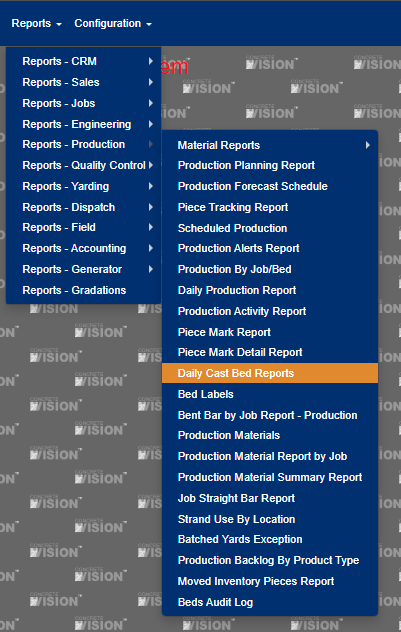
Figure 1
This takes you to the Daily Cast Bed Reports screen (Figure 2).
- Select the Location of the Bed (Required).
- Enter the Date (Required).
- Select the Materials if you want the Materials list showing in the Report.
- Select 'Report' button (Yellow highlighted in Figure 2) to export the data.
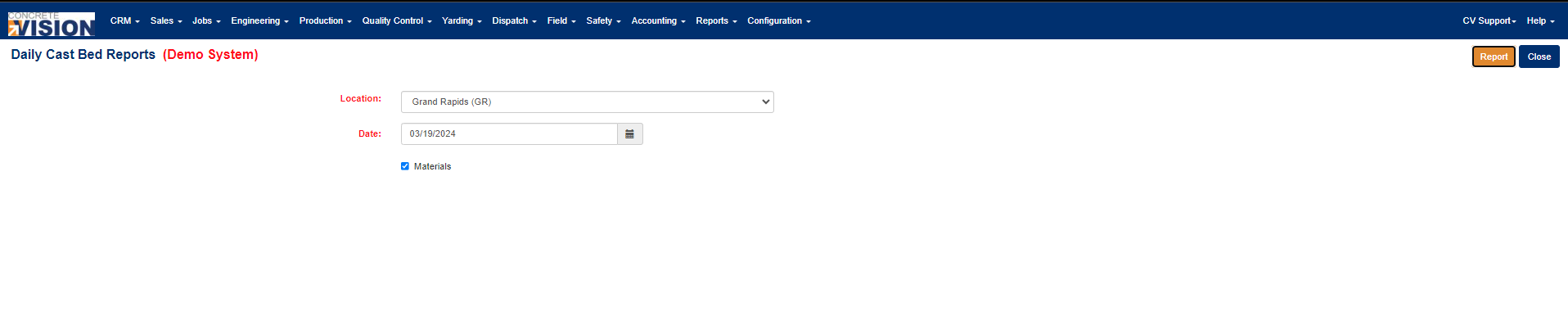
Figure 2
Was this article helpful?
That’s Great!
Thank you for your feedback
Sorry! We couldn't be helpful
Thank you for your feedback
Feedback sent
We appreciate your effort and will try to fix the article