You can access the screen from the "Production > Enter Batched Yards" menu, as shown below:
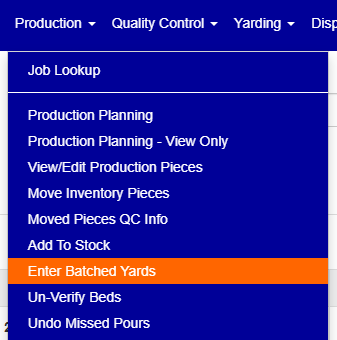
Figure 1
This screen allows you to enter the actual batched yards for each bed cast. The available filters are shown in Figure 2 below. You can currently filter by "Cast Date", "Location" (Plant), and "Bed" (Bed name / form).

Figure 2
The screen has three different views (Month, Week and Day). The default view is the month view shown in Figure 3. To switch between the different views, click on the tabs of the desired view (purple rectangle shown in Figure 3). To navigate between the previous/next date ranges, use the arrow keys on the left/right side of the screen (yellow squares shown in Figure 3).
The green highlight (green rectangle shown in Figure 3) over a specific cast means that it already contains batched yards.
When using the month view, the "Cast Date" filter shows the entire month of the date being filtered. For example, if the filter date is "11/21/2019", it will show casts for the entire month of Nov. 2019.
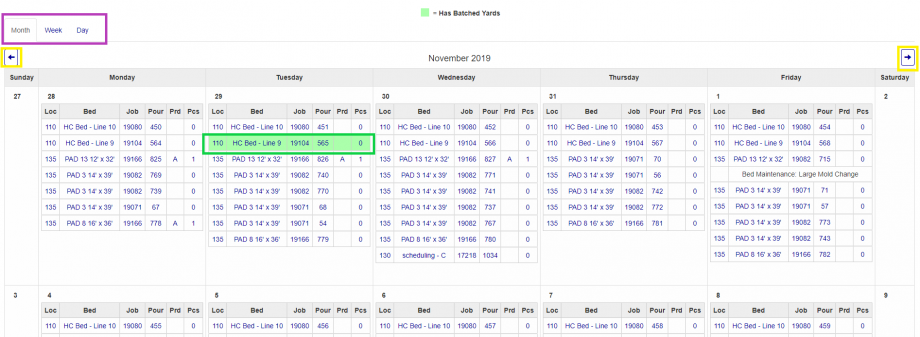
Figure 3
"Week View" shown below (Figure 4) lists casts by week. When using the week view, the "Cast Date" filter filters on the week of the selected date. For example, if the filter date is "11/21/2019", the view will show casts for the dates of Sunday 11/17/2019 - Saturday 11/23/2019.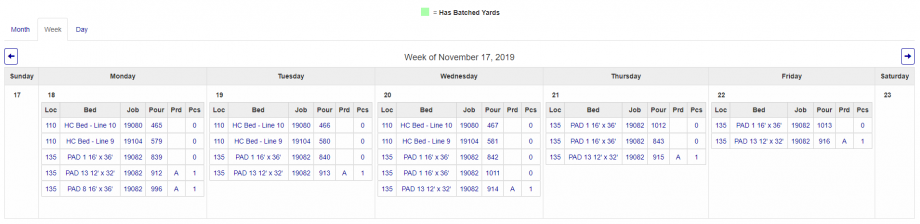
Figure 4
"Day View" (Figure 5) shows casts by a specific date.
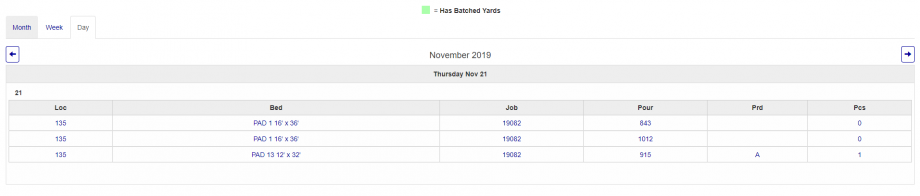
Figure 5
Clicking on a specific cast will allow you to add/edit batched yards for that cast (Figure 6). To add new yards, click on the "+" button (shown in the green square in Figure 6). To delete an existing entry, click on the "X" button (shown in the red square in Figure 6). To edit exiting batches, make the necessary changes in the form and click on the "Save" button (shown in the blue square in Figure 6) to save your changes.

Figure 6
Was this article helpful?
That’s Great!
Thank you for your feedback
Sorry! We couldn't be helpful
Thank you for your feedback
Feedback sent
We appreciate your effort and will try to fix the article