Overview
The Contact Search screen is the primary interface for finding, viewing, and managing contact records in the CRM system. This powerful tool allows users to search through the contacts database using multiple filter criteria and perform various operations on contact records.
Accessing the Screen
Navigate to CRM > Contact Search from the main menu to access this screen.
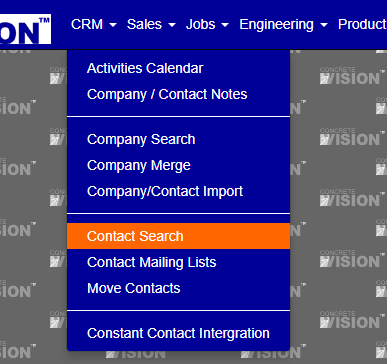
Figure 1
Screen Layout
The Contact Search screen (see Figure 1) is where you can view and edit an item.
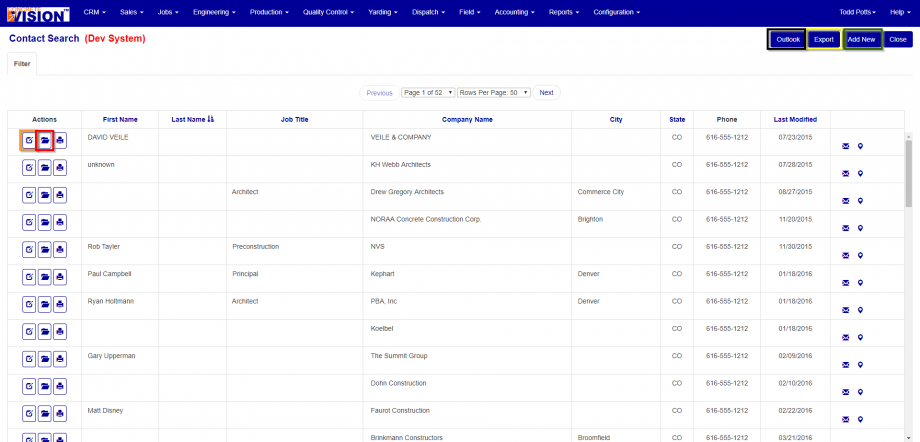
Figure 2
Edit Contact Information
Click on the edit button. (Orange Box see Figure 2)
View Contact Information
Click on the folder button. (Red Box see Figure 2)
Export Contact Information
Click on the Export button in the upper right corner. (Yellow Box see Figure 2)
Export Contacts Information for Import into Microsoft Outlook
Click on the Outlook button in the upper right corner. (Black Box see Figure 2)
Microsoft Outlook Import Instructions
Filter Contact Search
- Click on the filter button.
- You can select an Account Status.
- Search by First Name.
- Search by Last Name.
- Search by Job Title.
- Search by Company.
- You can select a Country.
- You can select a State.
- You can select a Class.
- You can select an Account Manager.
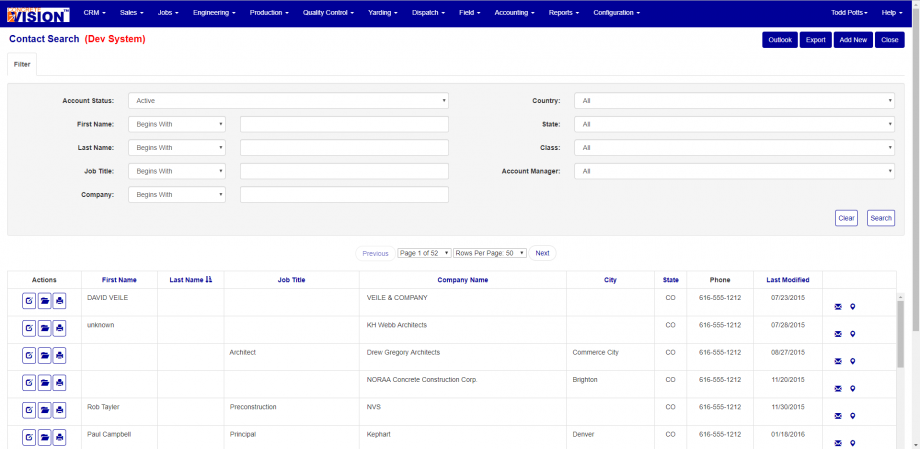
Figure 3
Search and Filter Options
Basic Filters
Account Status
- Active: Shows only active contact records
- Inactive: Shows only inactive contact records
- All: Shows both active and inactive records
First Name & Last Name
- Enter partial or complete contact name
- Choose search method:
- Begins With: Matches contact names starting with entered text
- Contains: Matches contact names containing entered text anywhere
- Equals: Exact match only
- Ends With: Matches contact names ending with entered text
Location Filters
Country
- Select from dropdown list of available countries
- Choosing a country will populate the State dropdown with relevant states
State
- Dynamically populated based on selected country
- For countries without predefined states, an "Other State" text field appears
Business Classification Filters
Company Name
- Enter partial or complete company name
- Choose search method:
- Begins With: Matches company names starting with entered text
- Contains: Matches company names containing entered text anywhere
- Equals: Exact match only
Classification
- Multi-select dropdown supporting multiple classifications:
- General Contractor
- Construction Manager
- Architect
- Engineering Firm
- Owner
- Erector
- Carrier
- Flag Car Carrier
- Competitor
- Crane Operator
Account Type
- Select specific account type from available options
- Determined by company's business relationship classification
Management Filters
Account Manager
- Filter by assigned account manager
- Dropdown shows all active account managers in the system
How to Search Contacts
Performing a Search
- Set desired filter criteria in the Filter section
- Click the Search button to execute the search
- Results will display in the grid below
Clearing Filters
- Click the Clear button to reset all filter criteria to default values
- This will show all active companies with default sorting
Results Grid Features
Column Information
The results grid displays the following columns:
- Actions: Edit, view details, and print buttons
- First Name: Contact's first name
- Last Name: Contact's last name
- Job Title: Contact's job title
- Company Name: Company contact is associated with
- City: Company's primary city location
- State: Company's state/province
- Phone: Primary phone number
- Contact Type: Contact classification
- Email/Map Links: Icons for email and map quick links
Sorting Search Results
Click on column headers to sort contact search results:
- First Name
- Last Name
- Job Title
- Company Name
- City
- State
- First click sorts ascending, second click sorts descending
Pagination
- Use the pagination controls below the filter section
- Select page number from dropdown
- Choose rows per page (50, 100, 150, 200)
- Use Previous/Next buttons to navigate
Was this article helpful?
That’s Great!
Thank you for your feedback
Sorry! We couldn't be helpful
Thank you for your feedback
Feedback sent
We appreciate your effort and will try to fix the article