Overview
Create New Opportunity is where every new job or project begins in Concrete Vision (CV). This process captures essential project details and generates a Sales record that can be built upon throughout the project lifecycle.
Accessing Create New Opportunity
From the main menu, navigate to Sales > Create New Opportunity (see Figure 1).
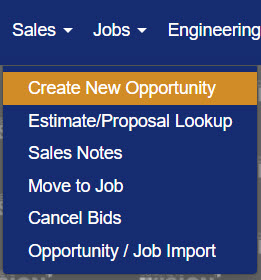
Figure 1
Create New Opportunity Screen
The Create New Opportunity screen (Figure 2) collects the foundational details needed to create a new project record. All required fields are marked with a red asterisk (*).
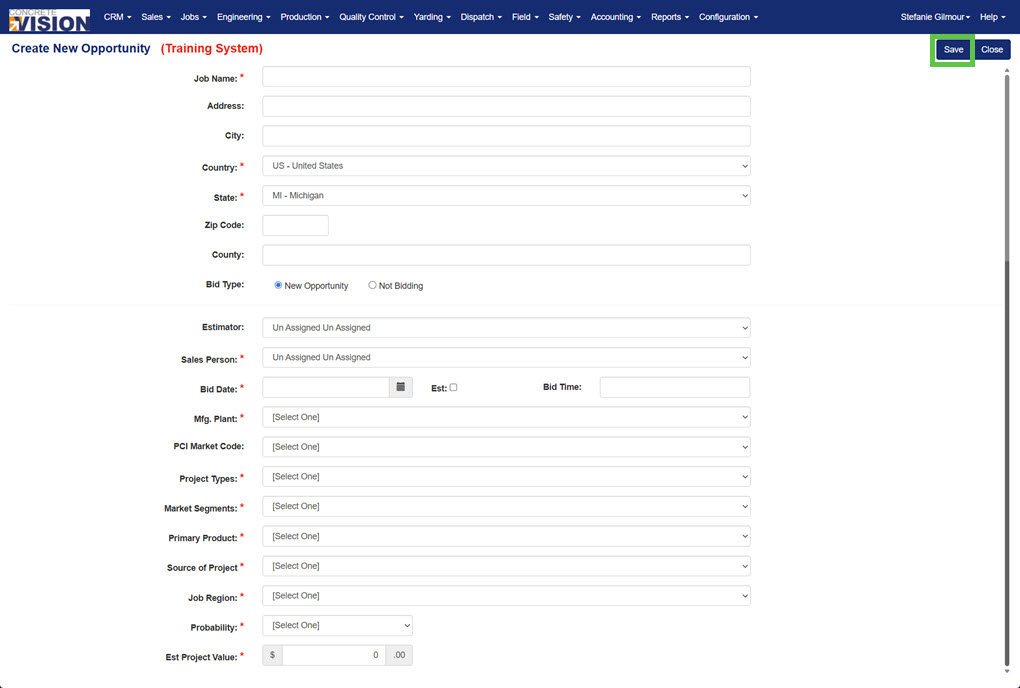
Figure 2
Field Descriptions
| # | Field | Required | Notes |
|---|---|---|---|
| 1 | Job Name | ✓ | |
| 2 | Address | ||
| 3 | City | ||
| 4 | Country | ✓ | Defaults to US – United States |
| 5 | State | ✓ | Defaults to MI – Michigan |
| 6 | Zip Code | ||
| 7 | County | ||
| 8 | Bid Type | ||
| 9 | Estimator | ||
| 10 | Sales Person | ✓ | |
| 11 | Bid Date | ✓ | |
| 12 | Bid Time | ||
| 13 | Mfg. Plant | ✓ | Select the lead manufacturing plant |
| 14 | PCI Market Code | ||
| 15 | Project Types | ✓ | |
| 16 | Market Segments | ✓ | |
| 17 | Primary Product | ✓ | |
| 18 | Source of Project | ✓ | |
| 19 | Job Region | ✓ | |
| 20 | Probability | ✓ | |
| 21 | Est. Project Value | ✓ | See note below |
Note: If the estimated project value is not yet known, enter $1 as a placeholder and update the field once a value has been determined.
Saving the Record
Once all required fields have been completed, click the Save button (Green box, Figure 2) to save the record and be taken to the Sales – Information screen. Clicking Close will exit the screen without creating the opportunity.
Sales – Information Screen
After saving, the Sales – Information screen (Figure 3) is displayed. This is the main hub for managing all details related to the newly created opportunity. Additional project information can be entered and updated here throughout the sales process.
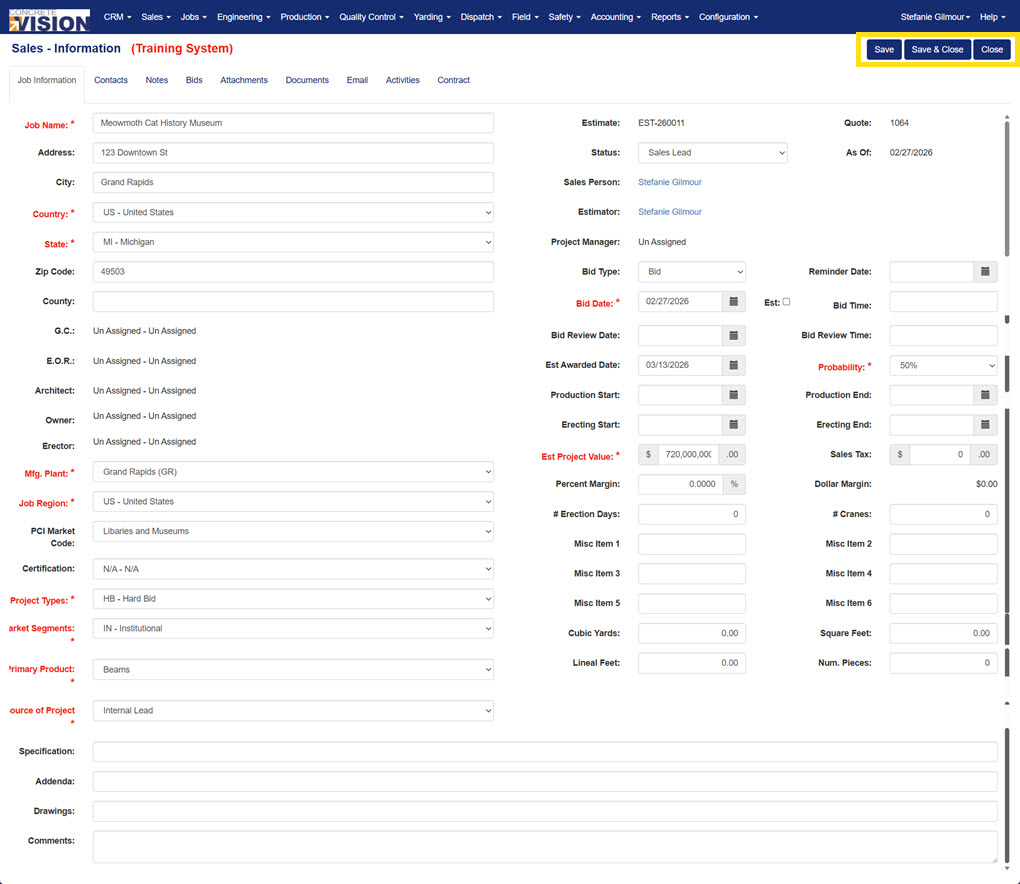
Figure 3
Action Buttons
The following buttons appear in the top-right corner of the screen (Yellow box, Figure 3):
- Save – Saves any progress made on the current screen without closing it.
- Save & Close – Saves progress and returns to the previous screen.
- Close – Closes the screen without saving any unsaved changes.
Screen Tabs
The Sales – Information screen is organized into the following tabs, each covering a different aspect of the opportunity:
- Job Information – Core project details carried over from the Create New Opportunity screen, plus additional fields.
- Contacts – Key contacts associated with the project.
- Notes – Internal notes related to the opportunity.
- Bids – Bid-related information and history.
- Attachments – Files and documents attached to the record.
- Documents – Generated documents associated with the job.
- Email – Email correspondence tied to the opportunity.
- Activities – Logged activities and follow-ups.
- Contract – Contract details once the job has progressed.
Was this article helpful?
That’s Great!
Thank you for your feedback
Sorry! We couldn't be helpful
Thank you for your feedback
Feedback sent
We appreciate your effort and will try to fix the article