Overview
The Update Restricted Permissions feature is a powerful administrative tool that allows you to manage user access control by setting Restrictions across the Concrete Vision system. This centralized interface enables bulk permission updates, ensuring that users have appropriate access to system screens based on their roles and responsibilities.
Key Benefits
- Streamlined access management - Update multiple users simultaneously
- Enhanced security - Control access to sensitive financial data
- Support team efficiency - Quickly grant comprehensive access to CV Support members
- Consistency - Ensure uniform permission application across user groups
Accessing Update Restricted Permissions
Navigation Path: From the main navigation menu, expand Configuration, select System Setup, then click Update Restricted Permissions (see Figure 1).
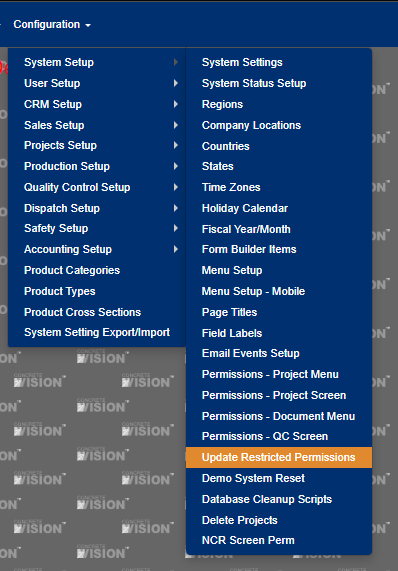
Figure 1
Permission Types
1. Update System Administrator Restricted Screens
Visual Reference: Red Box in Figures 2 and 3
What It Does
This option provides full system access to Concrete Vision Support team members, enabling them to assist with troubleshooting, configuration, and user support without restrictions.
Who It Affects
- All users assigned to the CV Support Group
- Internal Concrete Vision support staff
- System administrators designated as support personnel
Access Granted
- All non-restricted screens throughout the application
- Complete system functionality for support and troubleshooting
- Configuration and setup screens
- User management interfaces
When to Use
- After adding new support team members
- When deploying new system features or screens
- During initial system setup
- After major system updates or upgrades
Note: This is a powerful permission set. Only assign users to the CV Support Group who require comprehensive system access for their job functions.
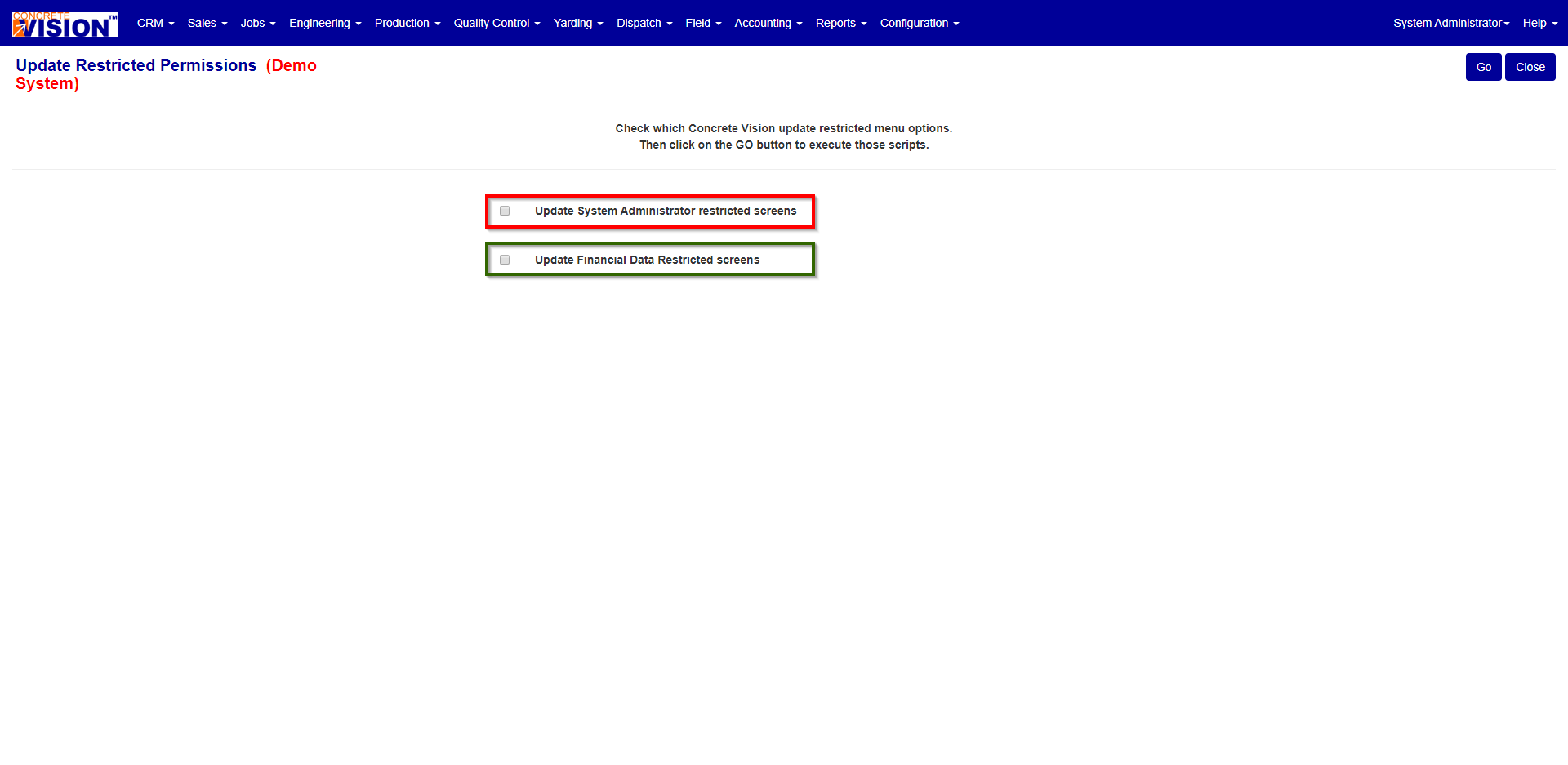
Figure 2
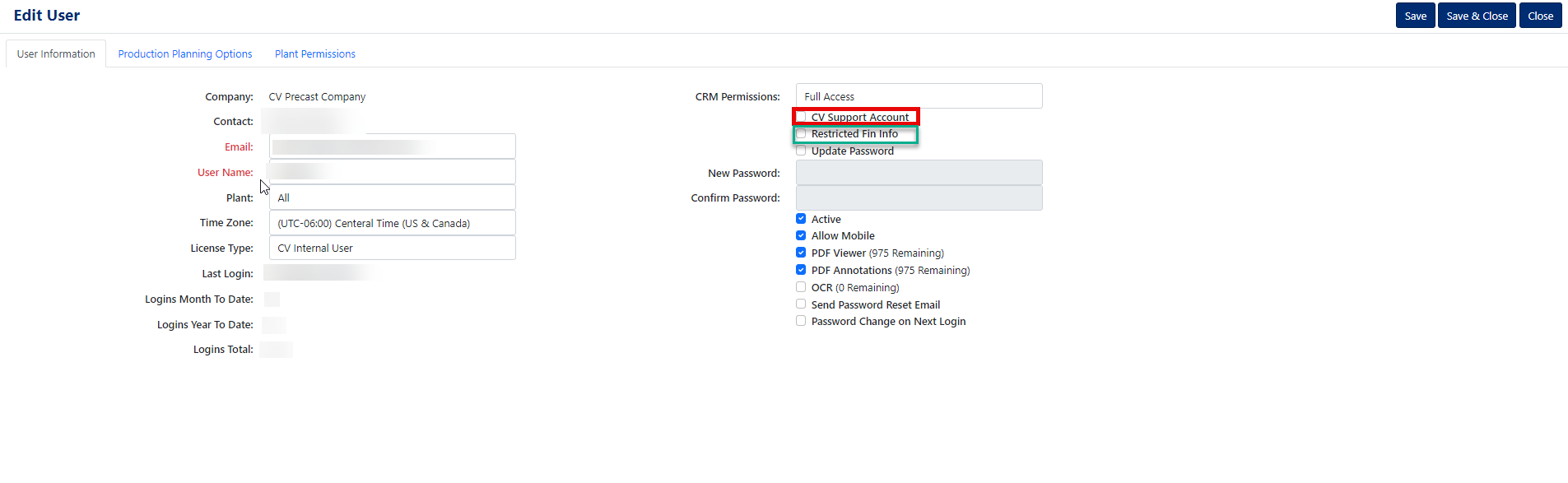
Figure 3
2. Update Financial Data Restricted Screens
Visual Reference: Green Box in Figures 2 and 3
What It Does
This option grants access to financially sensitive screens within Concrete Vision, allowing designated users to view and work with restricted financial information.
Who It Affects
Users with the 'Restricted Fin Info' checkbox enabled in their user profile (Figure 3).
Access Granted
All screens in the system that contain the keyword 'RESTRICTED' in the title, which typically include:
- Financial reports and analytics
- Pricing and cost information
- Profit margin data
- Budget and forecast screens
- Payment and invoice details
- Sensitive accounting information
Typical User Roles
- Chief Financial Officer (CFO)
- Financial Controllers
- Accounting Managers
- Senior Accountants
- Executive leadership team members
- Authorized financial analysts
When to Use
- After hiring new financial team members
- When promoting employees to roles requiring financial data access
- After creating new restricted financial screens
- During annual access reviews and audits
Best Practice
Document which users have this permission enabled and review access quarterly to ensure compliance with your organization's financial data policies.
Step-by-Step Instructions
Granting Support Team Access
- Navigate to Configuration menu → System Setup → Update Restricted Permissions
- Locate the Update System Administrator Restricted Screens checkbox (red box)
- Check the box to enable the update
- Click Save or Update to apply changes
- Verify that CV Support Group members can now access previously restricted screens
Granting Financial Data Access
First, ensure the user has the 'Restricted Fin Info' checkbox enabled:
- Go to Configuration menu → User Setup → User Login → Edit User
- Locate the Restricted Fin Info checkbox (shown in Figure 3)
- Check this box and save the user profile
Then, apply system-wide financial permissions:
- Navigate to Configuration menu → System Setup → Update Restricted Permissions
- Locate the Update Financial Data Restricted Screens checkbox (green box)
- Check the box to enable the update
- Click Save or Update to apply changes
Finally, verify the user can access restricted financial screens
Security and Compliance
Access Control Guidelines
Principle of Least Privilege: Grant users only the minimum access necessary to perform their job functions. Regularly review and revoke unnecessary permissions.
Separation of Duties: Ensure that financial data access is appropriately distributed to maintain checks and balances within your organization.
Was this article helpful?
That’s Great!
Thank you for your feedback
Sorry! We couldn't be helpful
Thank you for your feedback
Feedback sent
We appreciate your effort and will try to fix the article