Overview
The Project Bid Types screen allows you to view, create, edit, and manage bid types for your sales projects. Bid types help categorize and track different bidding approaches for your projects.
Accessing Project Bid Types
Navigate to Configuration menu > Sales Setup > Project Bid Types (see Figure 1).
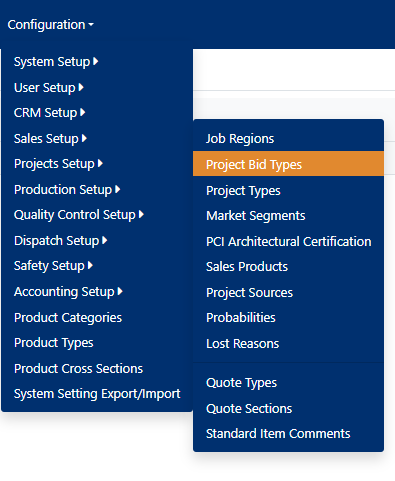
Figure 1
Managing Bid Types

Figure 2
Sorting and Filtering
To organize the bid types table:
- Click the funnel icon by any column heading (Green box, Figure 2) to sort by that column.
- Click the same heading again and select Clear to remove the sort filter.
Adding a New Bid Type
To create a new bid type:
- Click the Add new record button (Red box, Figure 2)
- The "Add New" modal window will appear
- Complete the following fields:
- Code (Required) - Enter a unique identifier for the bid type
- Description (Required) - Provide a clear description of the bid type
- Default Bid (Optional) - Check this box to set as the default bid type
- Not Bidding Type (Optional) - Check this box if this represents a non-bidding status
- Active - This is checked by default for new records
- Click Save to create the new bid type (Red box, Figure 3)
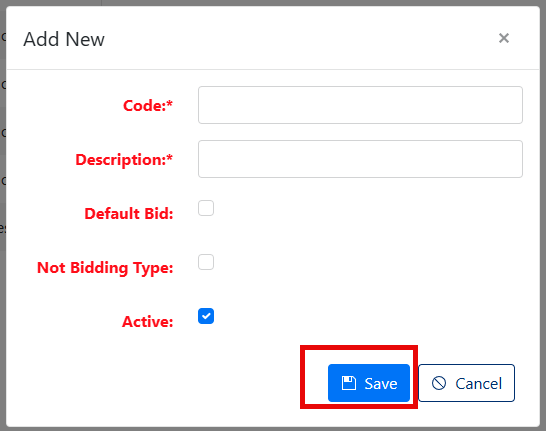
Figure 3
Editing an Existing Bid Type
To modify a bid type:
- Click the Pencil icon next to the bid type you want to edit (Purple box, Figure 2)
- The "Edit Bid" modal window will appear
- Modify any of the following fields as needed:
- Code (Required)
- Description (Required)
- Default Bid checkbox
- Not Bidding Type checkbox
- Active status
- Click Save to apply your changes (Red box, Figure 4)
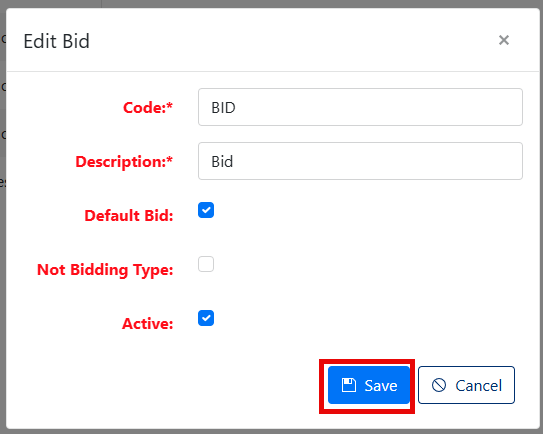
Figure 4
Deleting a Bid Type
To remove a bid type:
- Click the 'X' button in the corresponding row of the bid type you wish to delete (Yellow box, Figure 2)
- A confirmation dialog will appear asking "Are you sure you want to delete this record?"
- Click OK to confirm deletion (see Figure 5)
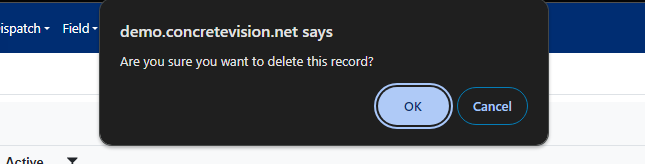
Figure 5
Note: You can only delete bid types that have no associated project details. If a bid type is currently in use, the delete button will be disabled.
Was this article helpful?
That’s Great!
Thank you for your feedback
Sorry! We couldn't be helpful
Thank you for your feedback
Feedback sent
We appreciate your effort and will try to fix the article