Overview
The Additional Quality Control Holds screen lists all pieces in production that require additional work such as finishing. When completion of the additional work is confirmed, a completed date is added, and the piece is released from the hold.
Accessing the Screen
Navigate to Quality Control > Additional QC Holds from the main menu (Figure 1).
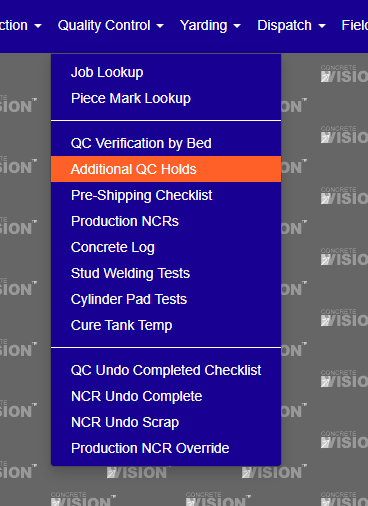
Figure 1
Using the Additional Quality Control Holds Screen
The Additional Quality Control Holds screen (Figure 2) is where completion dates are added to release additional work qc holds on pieces.
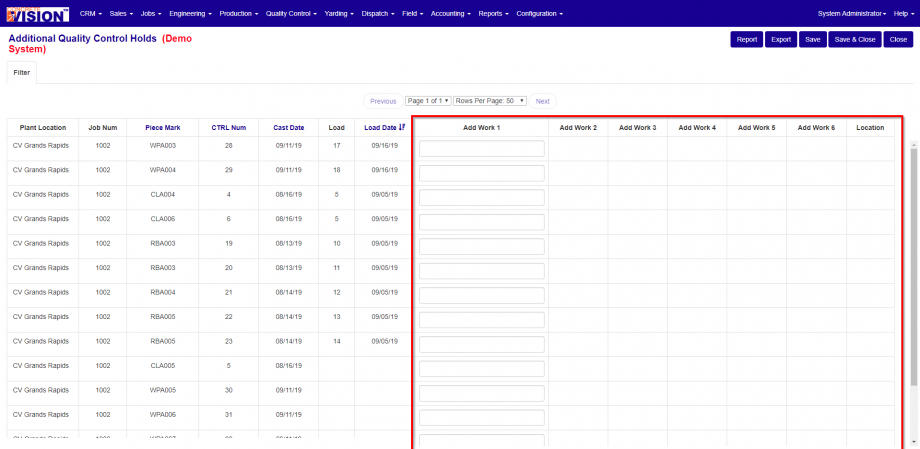
Figure 2
Release Piece from Additional Quality Control Hold
From the Additional Quality Control Holds screen (Figure 2):
- Locate the piece by using the Filter tab or Table Columns filter.
- On the table row of the piece, enter the date(s) the additional work was completed (Red Box in Figure 2).
- Click the Save button to save the date(s) and remain on the screen, or the Save & Close button to save the date(s) and close the screen.
Note: Their will be a field to enter the a date for all of the additional work fields required for the piece in that row.
Filtering the Additional Quality Control Holds Screen
From the Additional Quality Control Holds screen (Figure 2):
- Click the Filter tab. It will expand, displaying the filter options (Figure 3).
- Choose filter options from Location, Job and Days to Ship.
- Click the Search button in the expanded filter.
Note: Clicking the Clear button will reset the filter.
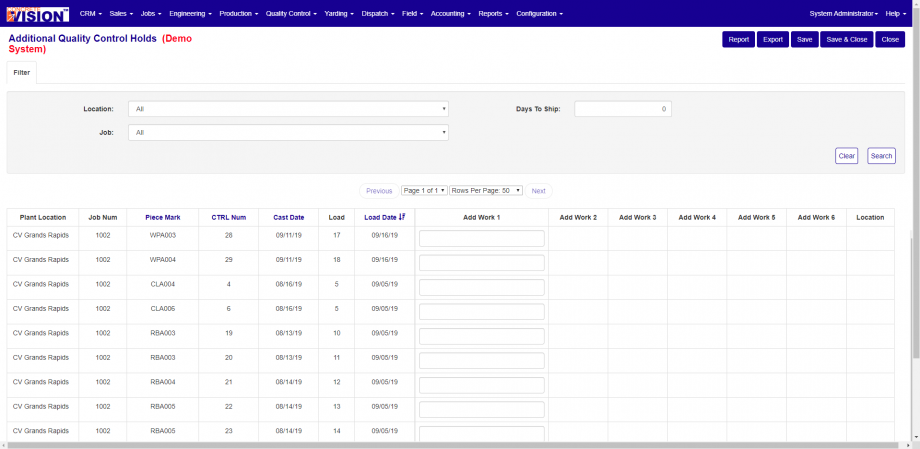
Figure 3
Was this article helpful?
That’s Great!
Thank you for your feedback
Sorry! We couldn't be helpful
Thank you for your feedback
Feedback sent
We appreciate your effort and will try to fix the article