You access Sales Territories from the Configuration > CRM Setup > Sales Territories, shown below.
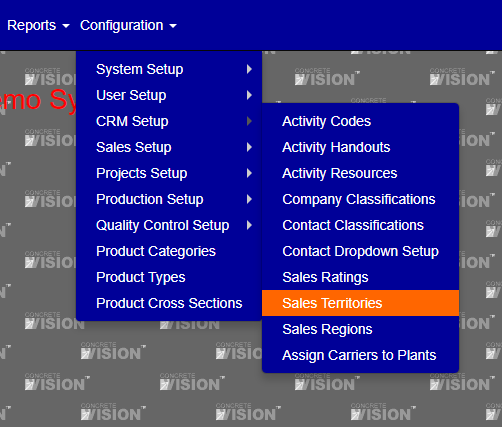
Figure 1
The Sales Territories screen (see Figure 2) is where you can view and edit Sales Territories.
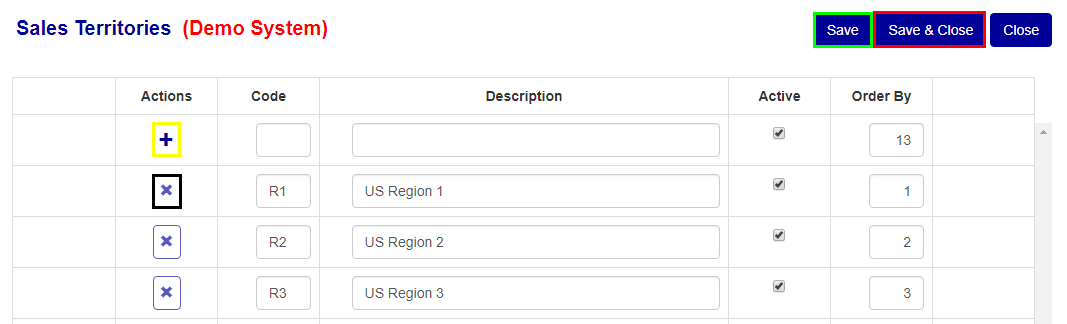
Figure 2
Add Sales Territories
To add a new Sales Territories, fill in the information on the top row of the table. Once filled in, click the "+" button (Yellow box Figure 2) to add the Sales Territories.
Edit Sales Territories
To edit any Sales Territories information, change the values on the row of the Sales Territories you wish to edit, then click the "Save" (Green box Figure 2) or "Save & Close" button (Red box Figure 2).
Delete Sales Territories
To delete any of the Sales Territories, click the "x" button (Black box Figure 2) of the corresponding row of the Sales Territories you wish to delete.
Was this article helpful?
That’s Great!
Thank you for your feedback
Sorry! We couldn't be helpful
Thank you for your feedback
Feedback sent
We appreciate your effort and will try to fix the article