Overview
The Field Reports screen in Project Document allows you to manage project field note materials.
Accessing Project Documents: Field Report
- Navigate to Jobs > Project Documents from the main menu.
- Click the Field Report tab.
Creating a New Project Field Report
From the Field Reports screen:
- Click the Add New button. A pop-up window will display.
- Select the job from the dropdown menu.
- Select a date for the report.
- Select the Field Foreman from the dropdown menu.
- Click Add New to add a field report to the selected job. The Field Report - Edit screen will display.
- Add any field report content and options.
- Click the Save button to save the information, or the Save & Close button to save the information and return to the Field Reports screen.
Editing a Project Field Report
Unlike other Project Documents, there are not multiple tabs on the Field Report - Edit screen, but rather multiple sections (Figure 1).
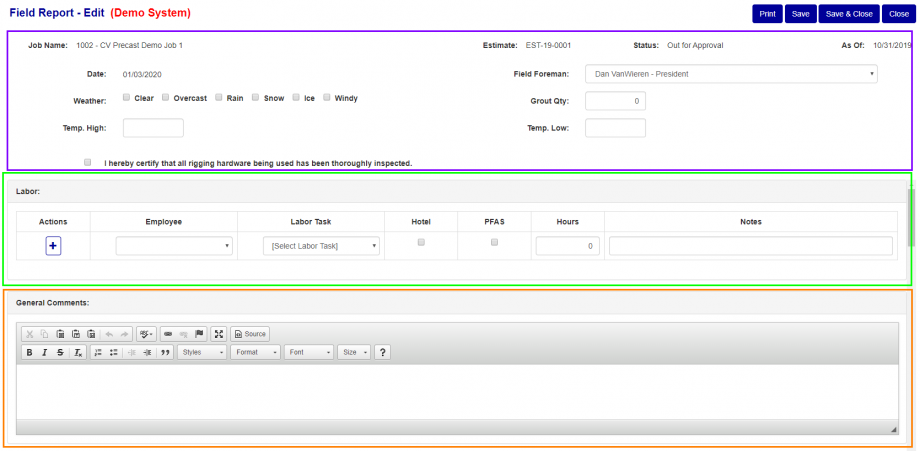
Figure 1
- The top portion of the page (Purple box Fig. 1) is used for basic/general information.
- There are a few sections that have inline edits such as Labor (Green box Fig. 1). To add a new entry, fill out the row with the appropriate values and dropdowns, then press save or save and close.
- There are also a few Text Box section like General Comments (Orange box Fig. 1) where you can enter in text with minimal formatting.
- At the bottom of the page is table for attachments. This is the standard Attachments menu, see link for documentation http://support.concretevision.com/documentation/attachments/
Was this article helpful?
That’s Great!
Thank you for your feedback
Sorry! We couldn't be helpful
Thank you for your feedback
Feedback sent
We appreciate your effort and will try to fix the article