The mobile Assign Yard Locations module is used to track the location of production pieces via a mobile device. From the mobile device the yardman which positions the production piece to a new yard location would scan the piece’s barcode using the barcode scanner (see Reference). At which point they would enter the piece mark’s new location (see Figure 2) and (If weight verification is required for the piece) enter the actual produced weight (see Figure 4).
Reference: Barcode Scanner
Note: Weights are rounded to the next whole number
You access the mobile Assign Yard Locations screen from the Mobile menu, shown below.
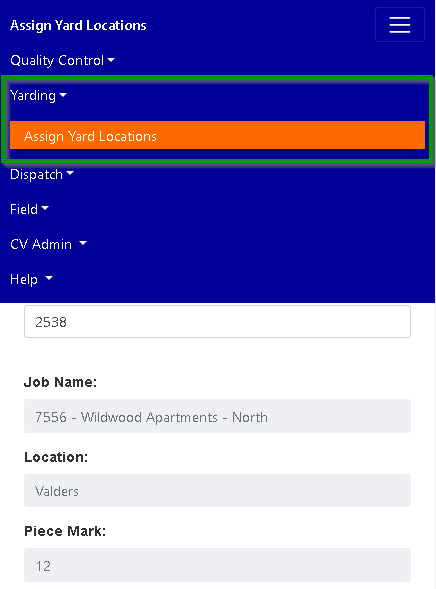
Figure 1
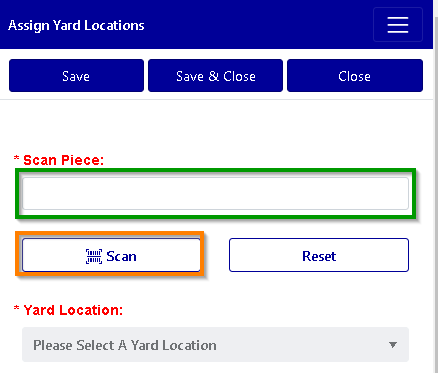
Figure 2
Lookup Piece
Press on the “Scan” button (see the Orange box in Figure 2) to use your devices camera to capture the piece’s unique Id (Reference: Barcode Scanner) or enter the Piece Id into the Scan Piece input field. (see the Green box in Figure 2).
If you manually enter the piece’s unique Id, press on the “Please Select a Yard Location” for the lookup to begin.
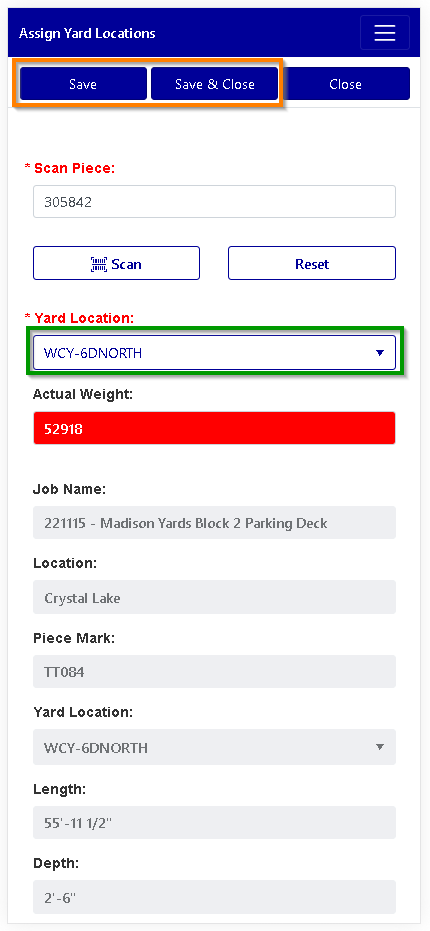
Figure 3
Assign Yard Location
Press on the Please Select a Yard Location (see the Green box in Figure 3) scroll to find or enter the piece’s current Yard Location.
Press either the Save or Save & Close buttons (see the Orange box in Figure 3) at the top of your screen, to save your changes.
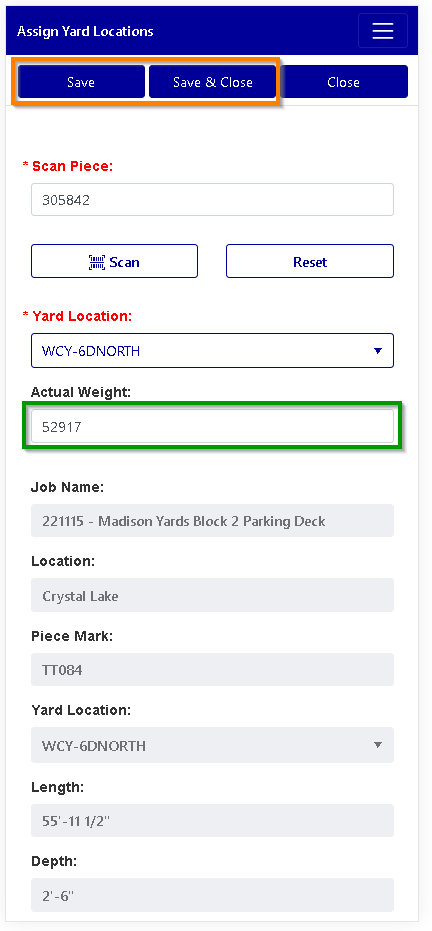
Figure 4
Enter Actual Weight (* Only seen If weight verification is required for the piece. Please note: Weights are rounded to the next whole number)
Press on the Actual Weight field (see the Green box in Figure 4) to enter the final actual weight of the produced piece. If the actual weight of the piece is heavier than expected, an email is generated for further review.
Press either the Save or Save & Close buttons (see the Orange box in Figure 4) to save your changes.
** Leaving the screen after making changes without pressing the save or save & close buttons will cause the changes not to be recorded.
Was this article helpful?
That’s Great!
Thank you for your feedback
Sorry! We couldn't be helpful
Thank you for your feedback
Feedback sent
We appreciate your effort and will try to fix the article