You access the Escorts from the Configuration menu under Dispatch Setup (Figure 1).
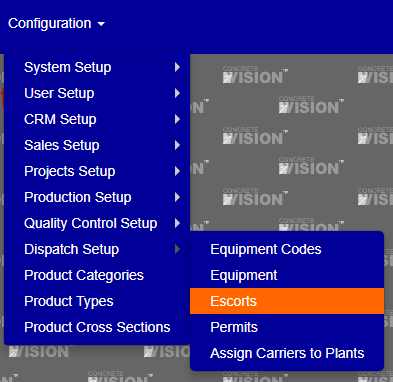
Figure 1
The Escorts screen (see Figure 2) is where you can view and edit Escorts.
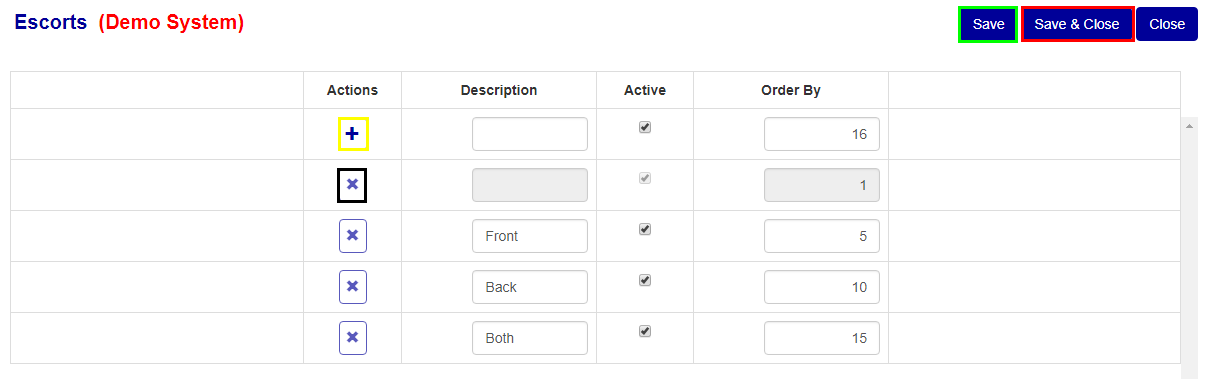
Figure 2
Add Escort
To add a new Escort, fill in the information on the top row of the table. Once filled in, click the “+” button (Yellow box Figure 2) to add the escort.
Edit Escort
To edit any Escort information, change the values on the row of the escort you wish to edit, then click the “Save” (Green box Figure 2) or “Save & Close” button (Red box Figure 2).
Delete Escort
To delete any of the Escorts, click the “x” button (Black box Figure 2) of the corresponding row of the Escort you wish to delete.
Was this article helpful?
That’s Great!
Thank you for your feedback
Sorry! We couldn't be helpful
Thank you for your feedback
Feedback sent
We appreciate your effort and will try to fix the article