The Project Contact Roles screen is where you can view and edit contact roles.
You access Project Contact Roles from the Configuration menu > Projects Setup > Project Contact Roles, shown below in Figure 1.
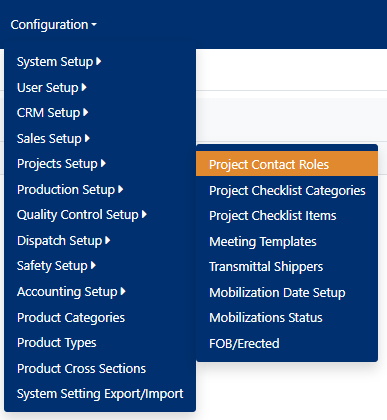
Figure 1
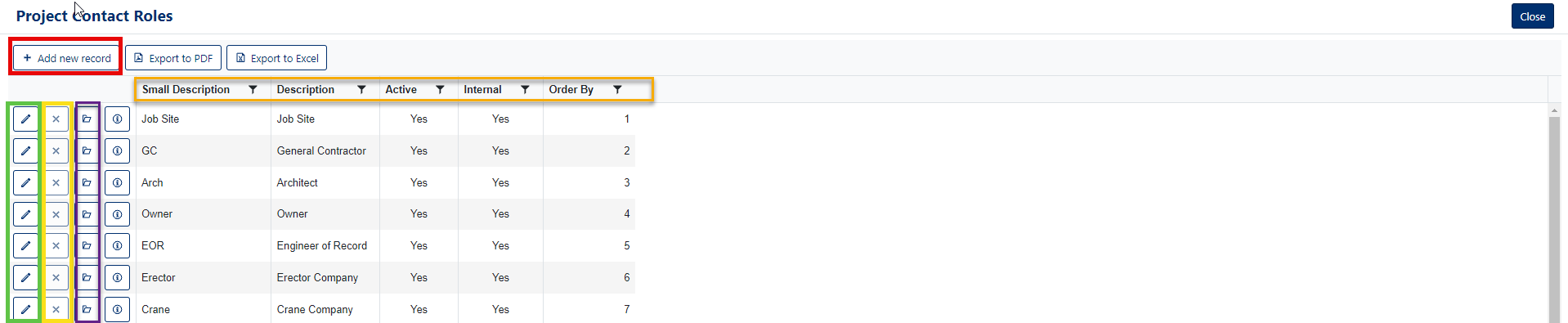
Figure 2
Add Project Contact Roles
- Click the Add new record button to add a new Project Contact Role (see Red box, Figure 2).
The Add New Modal opens which allows you fill out the form.
- Enter the Small Description for the Project Contact Role. (Required see Figure 3).
- Enter a Description for the Project Contact Role. (Required)
- Active is checked by default when adding a new Project Contact Role .
- Enter the Order By.
- Click the Save button to save the new record. (Orange box in Figure 3).
Edit Project Contact Roles
* You cannot edit the first 25 contact roles
- Click the Pencil icon button to edit the Project Contact Role (see Green box, Figure 2).
The Edit Modal opens which allows you fill out the form.
- Modify the Small Description for the Project Contact Role. (Required see Figure 4).
- Modify the Description for the Project Contact Role. (Required)
- Edit the Active Status, can turn Project Contact Role in record Inactive.
- Edit the Order By.
- Click the Save button to save the changes made to the record. (Orange box in Figure 4).
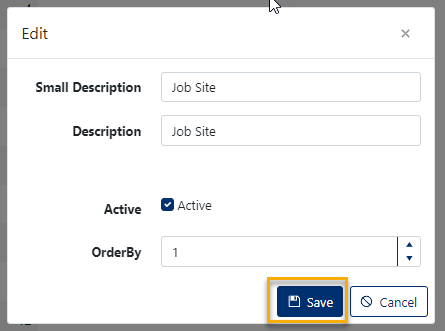
Figure 4
Delete Project Contact Roles
- Click on the 'x' button of the corresponding row of the Project Contract Role you wish to delete (Yellow box in Figure 2).
- This will open a confirmation window where you will be asked "Are you sure you want to delete this record?" click [OK] to allow the deletion. (see Figure 5).
**You can only delete Project Contact Roles that are not currently assigned to an Activity. If a Project Contact Roles is assigned to an activity, the delete button will be disabled.
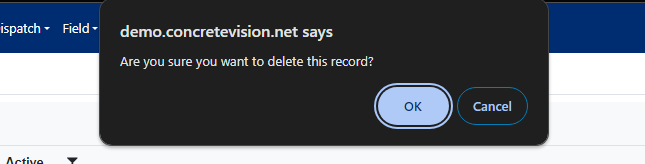
Figure 5